Showing posts with label GWT. Show all posts
Showing posts with label GWT. Show all posts
As an Amazon Associate I earn from qualifying purchases.
As an Amazon Associate I earn from qualifying purchases.
Using HTML panel
I needed to create a subscript text with a link that open up a new popup with different content. Since HorizontalPanel does not work, I used HTMLPanel and use the table tag, which contained element id as shown below.
Click on below image to read the code: CSS
 CSS code:
Here is how it looks:

Click on below image to read the code: CSS

.subscript {
font-size: xx-small;
vertical-align: bottom;
}
.hyperlink_subscript {
text-decoration: none;
cursor: pointer;
color: #0099FF;
font-size: xx-small;
font-weight: normal;
}

Using HTML panel
I needed to create a subscript text with a link that open up a new popup with different content. Since HorizontalPanel does not work, I used HTMLPanel and use the table tag, which contained element id as shown below.
Click on below image to read the code: CSS
 CSS code:
Here is how it looks:

Click on below image to read the code: CSS

.subscript {
font-size: xx-small;
vertical-align: bottom;
}
.hyperlink_subscript {
text-decoration: none;
cursor: pointer;
color: #0099FF;
font-size: xx-small;
font-weight: normal;
}

As an Amazon Associate I earn from qualifying purchases.

As an Amazon Associate I earn from qualifying purchases.
How to create a label with an image background in GWT
In order to create a label with an image background, you will need to use an AbsolutePanel with an image background defined in CSS and add a Label to it. The reason behind using an AbsolutePanel is because this type of panel allows for positioning all children absolutely, allowing them to overlap. Keep in mind however that you will have to resize the panel to allow room for all its children because it will NOT resize automatically.
Here is a sample implementation of how this worked for me:
Java code in Samle.java:
Here is a sample implementation of how this worked for me:
Java code in Samle.java:
AbsolutePanel absolutePanel = new AbsolutePanel();
absolutePanel.setStyleName("my_css_def");
Label myLabel = new Label("Hello world!");
absolutePanel.add(myLabel);
mainContainer.add(absolutePanel);
CSS definition in Sample.css file:
.my_css_def {
background-image: url("../images/myPath/bg_image.png"); !important;
height: 73px;
width: 108px;
}
How to create a label with an image background in GWT
In order to create a label with an image background, you will need to use an AbsolutePanel with an image background defined in CSS and add a Label to it. The reason behind using an AbsolutePanel is because this type of panel allows for positioning all children absolutely, allowing them to overlap. Keep in mind however that you will have to resize the panel to allow room for all its children because it will NOT resize automatically.
Here is a sample implementation of how this worked for me:
Java code in Samle.java:
Here is a sample implementation of how this worked for me:
Java code in Samle.java:
AbsolutePanel absolutePanel = new AbsolutePanel();
absolutePanel.setStyleName("my_css_def");
Label myLabel = new Label("Hello world!");
absolutePanel.add(myLabel);
mainContainer.add(absolutePanel);
CSS definition in Sample.css file:
.my_css_def {
background-image: url("../images/myPath/bg_image.png"); !important;
height: 73px;
width: 108px;
}
Needed: Java Google Web Toolkit (GWT) Developer
Job Description:
Development of Java Google Web Toolkit (GWT) based applications for sports community website and other Revere clients while following Revere Open Systems best practices and development culture.
Job Qualifications:
contact:
Uki D. Lucas
email "UkiDLucas - at - mac.com"
We are the organizers of Chicago Google Technology conferences:
http://chigtug6.eventbrite.com/
Development of Java Google Web Toolkit (GWT) based applications for sports community website and other Revere clients while following Revere Open Systems best practices and development culture.
Job Qualifications:
- Minimum of three years of professional Java application development.
- Ability to solve problems independently along with a strong teamwork sense, communication skills, often pair-programming and knowledge sharing.
- Familiarity with open source frameworks such as Hibernate, Spring and Maven.
- Experience with MySQL databases is highly desired.
- Deep understanding of various social media platforms such as Facebook, Twitter, etc.
- At least some level of experience with UNIX-based server environment (Linux/Mac).
- Willingness to learn various cutting edge technologies will be required.
- Understanding of Agile/SCRUM development and other methodologies preferred.
- Must be able to travel on a limited basis, typically less than 20%.
- Knowledge and passion for various sports is preferable.
- College degree (4 year) or equivalent work experience is required.
contact:
Uki D. Lucas
email "UkiDLucas - at - mac.com"
We are the organizers of Chicago Google Technology conferences:
http://chigtug6.eventbrite.com/
As an Amazon Associate I earn from qualifying purchases.
As an Amazon Associate I earn from qualifying purchases.
Compilation issue with gwt-dnd-2.6.5.jar - Java 1.6
Recently I had to use an updated version of gwt-dnd-2.6.5.jar with Snow Leopard (Mac OS X 10.6). I was using Java 1.5 and I got below error, which indicates a class being compiled with a different Java version:
java.lang.UnsupportedClassVersionError: Bad version number in .class file
Solution: It turns out that gwt-dnd-2.6.5.jar is using Java 1.6, therefore I had use same Java version (Java 1.6) in my environment in order for my project to comile correctly.
1. Click Eclipse -> preferences -> Java -> installed JRE

2. Click Eclipse -> preferences -> Java -> compile -> select 1.6

Compilation issue with gwt-dnd-2.6.5.jar - Java 1.6
Recently I had to use an updated version of gwt-dnd-2.6.5.jar with Snow Leopard (Mac OS X 10.6). I was using Java 1.5 and I got below error, which indicates a class being compiled with a different Java version:
java.lang.UnsupportedClassVersionError: Bad version number in .class file
Solution: It turns out that gwt-dnd-2.6.5.jar is using Java 1.6, therefore I had use same Java version (Java 1.6) in my environment in order for my project to comile correctly.
1. Click Eclipse -> preferences -> Java -> installed JRE

2. Click Eclipse -> preferences -> Java -> compile -> select 1.6

Eclipse 3.5 installation with GWT 2.0 RC1
1. Install Eclipse 3.5 (Galileo Eclipse IDE for JAVA EE Developers): http://www.eclipse.org/downloads/ Extract Eclipse package in Application directory (on your Mac).
2. Download latest Eclipse 3.5 plugin for GWT http://dl.google.com/eclipse/plugin/3.5/zips/gpe-e35-latest.zip Extract the archive into the dropins directory in your Eclipse installation. Your installation of Eclipse will now have a directory dropins/eclipse/features/com.google.gdt.eclipse.suite.e35.feature_version and some newly installed JAR files in dropins/eclipse/plugins/

2. Download latest Eclipse 3.5 plugin for GWT http://dl.google.com/eclipse/plugin/3.5/zips/gpe-e35-latest.zip Extract the archive into the dropins directory in your Eclipse installation. Your installation of Eclipse will now have a directory dropins/eclipse/features/com.google.gdt.eclipse.suite.e35.feature_version and some newly installed JAR files in dropins/eclipse/plugins/
Restart Eclipse. The plugin should now be installed!
3. In eclipse, Install SubEclipse (SVN):
Click on Help menu -> Install New Software -> paste http://subclipse.tigris.org/update_1.6.x and click add button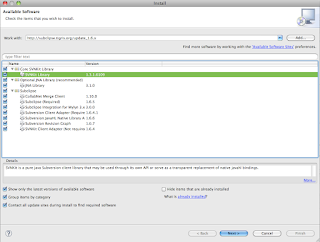

Select all options and click next
Click Finish and you will be asked to restart your Eclipse
4. Install Maven, if you are using Maven to manage dependancies in your project
Click on Help menu -> Install New Software -> paste http://m2eclipse.sonatype.org/update/http://m2eclipse.sonatype.org/update/ and click add button
Click on Help menu -> Install New Software -> paste http://m2eclipse.sonatype.org/update/http://m2eclipse.sonatype.org/update/ and click add button

Select all options and click next
Click Finish and you will be asked to restart your Eclipse
Eclipse 3.5 installation with GWT 2.0 RC1
1. Install Eclipse 3.5 (Galileo Eclipse IDE for JAVA EE Developers): http://www.eclipse.org/downloads/ Extract Eclipse package in Application directory (on your Mac).
2. Download latest Eclipse 3.5 plugin for GWT http://dl.google.com/eclipse/plugin/3.5/zips/gpe-e35-latest.zip Extract the archive into the dropins directory in your Eclipse installation. Your installation of Eclipse will now have a directory dropins/eclipse/features/com.google.gdt.eclipse.suite.e35.feature_version and some newly installed JAR files in dropins/eclipse/plugins/

2. Download latest Eclipse 3.5 plugin for GWT http://dl.google.com/eclipse/plugin/3.5/zips/gpe-e35-latest.zip Extract the archive into the dropins directory in your Eclipse installation. Your installation of Eclipse will now have a directory dropins/eclipse/features/com.google.gdt.eclipse.suite.e35.feature_version and some newly installed JAR files in dropins/eclipse/plugins/
Restart Eclipse. The plugin should now be installed!
3. In eclipse, Install SubEclipse (SVN):
Click on Help menu -> Install New Software -> paste http://subclipse.tigris.org/update_1.6.x and click add button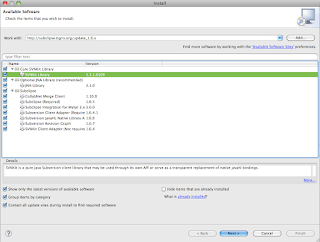

Select all options and click next
Click Finish and you will be asked to restart your Eclipse
4. Install Maven, if you are using Maven to manage dependancies in your project
Click on Help menu -> Install New Software -> paste http://m2eclipse.sonatype.org/update/http://m2eclipse.sonatype.org/update/ and click add button
Click on Help menu -> Install New Software -> paste http://m2eclipse.sonatype.org/update/http://m2eclipse.sonatype.org/update/ and click add button

Select all options and click next
Click Finish and you will be asked to restart your Eclipse
Updating Eclipse Galileo to GWT 2.0 RC2
Fresh installation is recommended.
Mac: use Cocoa 32 bit
Extract in Applications directory, for example:
/Applications/IDE/eclipse-jee-galileo-SR1-macosx-cocoa.tar.gz
Drag /Applications/IDE/eclipse/Eclipse.app to your dock to make a shortcut.
2) Download GWT SDK:
http://google-web-toolkit.googlecode.com/files/gwt-2.0.0-rc2.zip
Extract the zip in any location, example:
/opt/gwt/gwt-2.0.0-rc2.zip
/opt/gwt/gwt-2.0.0-rc2/gwt-dev.jar
Mac: use Cocoa 32 bit
Extract in Applications directory, for example:
/Applications/IDE/eclipse-jee-galileo-SR1-macosx-cocoa.tar.gz
Drag /Applications/IDE/eclipse/Eclipse.app to your dock to make a shortcut.
2) Download GWT SDK:
http://google-web-toolkit.googlecode.com/files/gwt-2.0.0-rc2.zip
Extract the zip in any location, example:
/opt/gwt/gwt-2.0.0-rc2.zip
/opt/gwt/gwt-2.0.0-rc2/gwt-dev.jar
3) Install Eclipse GWT Plugin:
download and extract into Eclipse dropins directory
http://dl.google.com/eclipse/plugin/3.5/zips/gpe-e35-latest.zip
You should have this, or newer:
/Applications/IDE/eclipse/dropins/eclipse/features/com.google.gdt.eclipse.suite.e35.feature_1.1.2.v200910131704
download and extract into Eclipse dropins directory
http://dl.google.com/eclipse/plugin/3.5/zips/gpe-e35-latest.zip
You should have this, or newer:
/Applications/IDE/eclipse/dropins/eclipse/features/com.google.gdt.eclipse.suite.e35.feature_1.1.2.v200910131704
Restart Eclipse, you should see the plugin.

If for any reason you don't see these 3 icons, delete Eclipse installation, and extract all again from the downloaded archives, take about 1 minute.
Following steps are optional depending on what you are using:
4) Install Eclipse SVN plugin: Menu.. Help.. Install new software...
http://subclipse.tigris.org/update_1.6.x
http://subclipse.tigris.org/update_1.6.x

You should be able to browse any SVN repositories by selecting..

and typing SVN in the search, then selecting "SVN repositories"
5) Install Eclipse Maven plugin: Menu.. Help.. Install New Software ...
http://m2eclipse.sonatype.org/update/


Please post comments and help tips
Updating Eclipse Galileo to GWT 2.0 RC2
Fresh installation is recommended.
Mac: use Cocoa 32 bit
Extract in Applications directory, for example:
/Applications/IDE/eclipse-jee-galileo-SR1-macosx-cocoa.tar.gz
Drag /Applications/IDE/eclipse/Eclipse.app to your dock to make a shortcut.
2) Download GWT SDK:
http://google-web-toolkit.googlecode.com/files/gwt-2.0.0-rc2.zip
Extract the zip in any location, example:
/opt/gwt/gwt-2.0.0-rc2.zip
/opt/gwt/gwt-2.0.0-rc2/gwt-dev.jar
Mac: use Cocoa 32 bit
Extract in Applications directory, for example:
/Applications/IDE/eclipse-jee-galileo-SR1-macosx-cocoa.tar.gz
Drag /Applications/IDE/eclipse/Eclipse.app to your dock to make a shortcut.
2) Download GWT SDK:
http://google-web-toolkit.googlecode.com/files/gwt-2.0.0-rc2.zip
Extract the zip in any location, example:
/opt/gwt/gwt-2.0.0-rc2.zip
/opt/gwt/gwt-2.0.0-rc2/gwt-dev.jar
3) Install Eclipse GWT Plugin:
download and extract into Eclipse dropins directory
http://dl.google.com/eclipse/plugin/3.5/zips/gpe-e35-latest.zip
You should have this, or newer:
/Applications/IDE/eclipse/dropins/eclipse/features/com.google.gdt.eclipse.suite.e35.feature_1.1.2.v200910131704
download and extract into Eclipse dropins directory
http://dl.google.com/eclipse/plugin/3.5/zips/gpe-e35-latest.zip
You should have this, or newer:
/Applications/IDE/eclipse/dropins/eclipse/features/com.google.gdt.eclipse.suite.e35.feature_1.1.2.v200910131704
Restart Eclipse, you should see the plugin.

If for any reason you don't see these 3 icons, delete Eclipse installation, and extract all again from the downloaded archives, take about 1 minute.
Following steps are optional depending on what you are using:
4) Install Eclipse SVN plugin: Menu.. Help.. Install new software...
http://subclipse.tigris.org/update_1.6.x
http://subclipse.tigris.org/update_1.6.x

You should be able to browse any SVN repositories by selecting..

and typing SVN in the search, then selecting "SVN repositories"
5) Install Eclipse Maven plugin: Menu.. Help.. Install New Software ...
http://m2eclipse.sonatype.org/update/


Please post comments and help tips
More GWT Date woes
So, as we all know, working with dates in GWT is not much fun given the lack of a Calendar class to do any sort of date manipulation. Incrementing and decrementing dates must now be done by adding and subtracting from the milliseconds that have elapsed since epoch.
So we have a method that does the calculating for you and it has been working fine, until I stumbled upon a very interesting bug. Apparently, there is some issue revolving around November 1, 2009. Here some some code to replicate my results:
Here is the output from this test:public void onModuleLoad(){DateTimeFormat format = DateTimeFormat.getFormat("dd/MM/yyyy H:mm:ss");String dateString = "01/11/2009 1:30:30";Date originalDate = format.parse(dateString);Date date = new Date();for (int i = -7; i < 8; i++){date = incrementDays(originalDate, i);System.out.println("DateUtil.incrementDay(" + i + ") = " + date.toString());}}private static Date incrementDays(Date date, int xdays){long time = date.getTime();time = time + (xdays * 24 * 60 * 60 * 1000);Date newDate = new Date(time);return newDate;}
DateUtil.incrementDay(-7) = Sun Oct 25 02:30:30 CDT 2009DateUtil.incrementDay(-6) = Mon Oct 26 02:30:30 CDT 2009DateUtil.incrementDay(-5) = Tue Oct 27 02:30:30 CDT 2009DateUtil.incrementDay(-4) = Wed Oct 28 02:30:30 CDT 2009DateUtil.incrementDay(-3) = Thu Oct 29 02:30:30 CDT 2009DateUtil.incrementDay(-2) = Fri Oct 30 02:30:30 CDT 2009DateUtil.incrementDay(-1) = Sat Oct 31 02:30:30 CDT 2009DateUtil.incrementDay(0) = Sun Nov 01 01:30:30 CST 2009DateUtil.incrementDay(1) = Mon Nov 02 01:30:30 CST 2009DateUtil.incrementDay(2) = Tue Nov 03 01:30:30 CST 2009DateUtil.incrementDay(3) = Wed Nov 04 01:30:30 CST 2009DateUtil.incrementDay(4) = Thu Nov 05 01:30:30 CST 2009DateUtil.incrementDay(5) = Fri Nov 06 01:30:30 CST 2009DateUtil.incrementDay(6) = Sat Nov 07 01:30:30 CST 2009DateUtil.incrementDay(7) = Sun Nov 08 01:30:30 CST 2009
As you can see, at November 1, the time gets decremented by one hour. I have not been able to figure out what exactly is causing this. I have run a ton of tests and have not been able to come up with any answers. All other dates in 2009 appear to work (although, I did not test them all). Also, November 1, 2010 does work, but it is off again on November 8.
Just another reason why we need a Calendar class for GWT.
If anyone has any ideas what is causing this, please let us know.
UPDATE:
Day light savings time did not cross my mind, and is seems to be the culprit in this issue. If anyone has any other ways of calculating the date on the client side in GWT, let us know. Thanks.
UPDATE #2:
Here is the new incrementDays() method to deal with this issue:
private static Date incrementDays(Date date, int xdays){long time = date.getTime();time = time - (xdays * 24 * 60 * 60 * 1000);Date newDate = new Date(time);Integer dateHour = new Integer(DateTimeFormat.getFormat("H").format(date));Integer newDateHour = new Integer(DateTimeFormat.getFormat("H").format(newDate));if (!dateHour.equals(newDateHour)){if (dateHour > newDateHour || (dateHour.equals(0) && newDateHour.equals(23))){time = time + (60 * 60 * 1000);newDate.setTime(time);} else if (dateHour < newDateHour){time = time - (60 * 60 * 1000);newDate.setTime(time);}}return newDate;}
More GWT Date woes
So, as we all know, working with dates in GWT is not much fun given the lack of a Calendar class to do any sort of date manipulation. Incrementing and decrementing dates must now be done by adding and subtracting from the milliseconds that have elapsed since epoch.
So we have a method that does the calculating for you and it has been working fine, until I stumbled upon a very interesting bug. Apparently, there is some issue revolving around November 1, 2009. Here some some code to replicate my results:
Here is the output from this test:public void onModuleLoad(){DateTimeFormat format = DateTimeFormat.getFormat("dd/MM/yyyy H:mm:ss");String dateString = "01/11/2009 1:30:30";Date originalDate = format.parse(dateString);Date date = new Date();for (int i = -7; i < 8; i++){date = incrementDays(originalDate, i);System.out.println("DateUtil.incrementDay(" + i + ") = " + date.toString());}}private static Date incrementDays(Date date, int xdays){long time = date.getTime();time = time + (xdays * 24 * 60 * 60 * 1000);Date newDate = new Date(time);return newDate;}
DateUtil.incrementDay(-7) = Sun Oct 25 02:30:30 CDT 2009DateUtil.incrementDay(-6) = Mon Oct 26 02:30:30 CDT 2009DateUtil.incrementDay(-5) = Tue Oct 27 02:30:30 CDT 2009DateUtil.incrementDay(-4) = Wed Oct 28 02:30:30 CDT 2009DateUtil.incrementDay(-3) = Thu Oct 29 02:30:30 CDT 2009DateUtil.incrementDay(-2) = Fri Oct 30 02:30:30 CDT 2009DateUtil.incrementDay(-1) = Sat Oct 31 02:30:30 CDT 2009DateUtil.incrementDay(0) = Sun Nov 01 01:30:30 CST 2009DateUtil.incrementDay(1) = Mon Nov 02 01:30:30 CST 2009DateUtil.incrementDay(2) = Tue Nov 03 01:30:30 CST 2009DateUtil.incrementDay(3) = Wed Nov 04 01:30:30 CST 2009DateUtil.incrementDay(4) = Thu Nov 05 01:30:30 CST 2009DateUtil.incrementDay(5) = Fri Nov 06 01:30:30 CST 2009DateUtil.incrementDay(6) = Sat Nov 07 01:30:30 CST 2009DateUtil.incrementDay(7) = Sun Nov 08 01:30:30 CST 2009
As you can see, at November 1, the time gets decremented by one hour. I have not been able to figure out what exactly is causing this. I have run a ton of tests and have not been able to come up with any answers. All other dates in 2009 appear to work (although, I did not test them all). Also, November 1, 2010 does work, but it is off again on November 8.
Just another reason why we need a Calendar class for GWT.
If anyone has any ideas what is causing this, please let us know.
UPDATE:
Day light savings time did not cross my mind, and is seems to be the culprit in this issue. If anyone has any other ways of calculating the date on the client side in GWT, let us know. Thanks.
UPDATE #2:
Here is the new incrementDays() method to deal with this issue:
private static Date incrementDays(Date date, int xdays){long time = date.getTime();time = time - (xdays * 24 * 60 * 60 * 1000);Date newDate = new Date(time);Integer dateHour = new Integer(DateTimeFormat.getFormat("H").format(date));Integer newDateHour = new Integer(DateTimeFormat.getFormat("H").format(newDate));if (!dateHour.equals(newDateHour)){if (dateHour > newDateHour || (dateHour.equals(0) && newDateHour.equals(23))){time = time + (60 * 60 * 1000);newDate.setTime(time);} else if (dateHour < newDateHour){time = time - (60 * 60 * 1000);newDate.setTime(time);}}return newDate;}
GWT 2.0 RC1
Subscribe to:
Posts (Atom)