Showing posts with label AOSP. Show all posts

Is the (Android) user a goat?

Is the (Android) user a goat?

A very important method to know your users. 


As an Amazon Associate I earn from qualifying purchases.

Is the (Android) user a goat?

Is the (Android) user a goat?

A very important method to know your users. 


As an Amazon Associate I earn from qualifying purchases.

Resizing Mac APFS disk to create a case-sensitive HFS (hfsx) for Linux sharing and Android builds

Resizing Mac APFS 500Gb to 350Gb and creating HFSx (case-sensitive) for AOSP building.


$ sudo diskutil apfs resizeContainer disk0s2 250g hfsx REPO 0b

..
Shrinking APFS Physical Store disk0s2 from 499,963,170,816 to 249,999,998,976 bytes
Shrinking APFS data structures

[ \ 0%..10%..20%..30%..40%............................... ] 47% 0:00:02 

..

Initialized /dev/rdisk0s3 as a 233 GB case-sensitive HFS Plus volume
Mounting disk
1 new disk created or changed due to APFS operation
Disk from APFS operation: disk0s3
Finished APFS operation
uki 192.168.1.7 13:16 ~ $ diskutil list
/dev/disk0 (internal):
   #:                       TYPE NAME                    SIZE       IDENTIFIER
   0:      GUID_partition_scheme                         500.3 GB   disk0
   1:                        EFI EFI                     314.6 MB   disk0s1
   2:                 Apple_APFS Container disk1         250.0 GB   disk0s2
   3:                  Apple_HFS REPO                    249.8 GB   disk0s3

/dev/disk1 (synthesized):
   #:                       TYPE NAME                    SIZE       IDENTIFIER
   0:      APFS Container Scheme -                      +250.0 GB   disk1
                                 Physical Store disk0s2
   1:                APFS Volume SYSTEM                  220.6 GB   disk1s1
   2:                APFS Volume Preboot                 22.3 MB    disk1s2
   3:                APFS Volume Recovery                509.8 MB   disk1s3

   4:                APFS Volume VM                      1.1 GB     disk1s4


REFERENCE:

http://www.peachpit.com/articles/article.aspx?p=1403238

https://www.macobserver.com/tips/deep-dive/resize-your-apfs-container/


As an Amazon Associate I earn from qualifying purchases.

Resizing Mac APFS disk to create a case-sensitive HFS (hfsx) for Linux sharing and Android builds

Resizing Mac APFS 500Gb to 350Gb and creating HFSx (case-sensitive) for AOSP building.


$ sudo diskutil apfs resizeContainer disk0s2 250g hfsx REPO 0b

..
Shrinking APFS Physical Store disk0s2 from 499,963,170,816 to 249,999,998,976 bytes
Shrinking APFS data structures

[ \ 0%..10%..20%..30%..40%............................... ] 47% 0:00:02 

..

Initialized /dev/rdisk0s3 as a 233 GB case-sensitive HFS Plus volume
Mounting disk
1 new disk created or changed due to APFS operation
Disk from APFS operation: disk0s3
Finished APFS operation
uki 192.168.1.7 13:16 ~ $ diskutil list
/dev/disk0 (internal):
   #:                       TYPE NAME                    SIZE       IDENTIFIER
   0:      GUID_partition_scheme                         500.3 GB   disk0
   1:                        EFI EFI                     314.6 MB   disk0s1
   2:                 Apple_APFS Container disk1         250.0 GB   disk0s2
   3:                  Apple_HFS REPO                    249.8 GB   disk0s3

/dev/disk1 (synthesized):
   #:                       TYPE NAME                    SIZE       IDENTIFIER
   0:      APFS Container Scheme -                      +250.0 GB   disk1
                                 Physical Store disk0s2
   1:                APFS Volume SYSTEM                  220.6 GB   disk1s1
   2:                APFS Volume Preboot                 22.3 MB    disk1s2
   3:                APFS Volume Recovery                509.8 MB   disk1s3

   4:                APFS Volume VM                      1.1 GB     disk1s4


REFERENCE:

http://www.peachpit.com/articles/article.aspx?p=1403238

https://www.macobserver.com/tips/deep-dive/resize-your-apfs-container/


As an Amazon Associate I earn from qualifying purchases.

Building and Installing Android AOSP

In these notes, I will document few things:

1) Building newest AOSP for the HiKey SBC
2) Installing new image in Android Studio Emulator
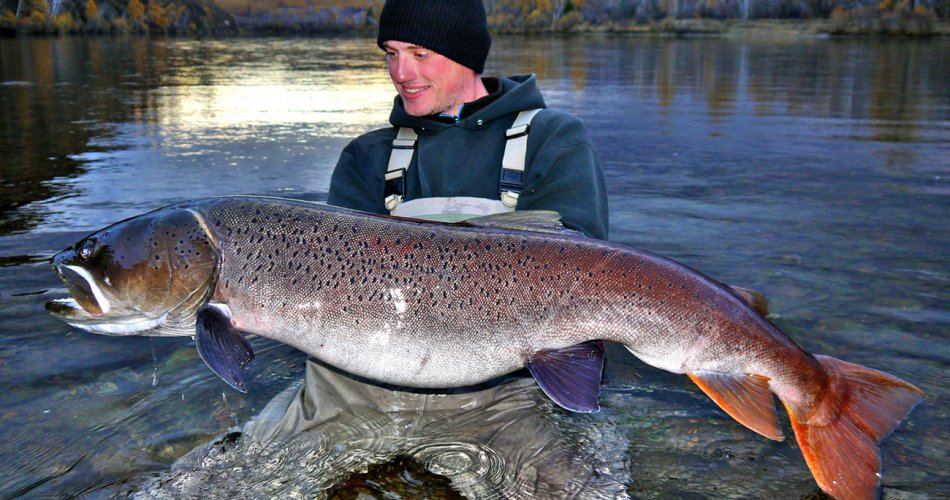
3) Installing Android Pie preview of Android "Tiamen" (a Siberian fish, the picture is shown below) on Pixel 2 XL.


General Info about the AOSP

read general info:

Preview Images

https://developer.android.com/preview/download.html#images

Android P (pie) image:
taimen-ppp1.180208.014-factory-8e44f67a.zip 

Emulator running preview:

Factory Images


Android Oreo image 8.1.0 (OPM1.171019.021, Mar 2018):


Hikey960 binaries for Android 8.0.0 (20171017) ARM:


Hardware specific Binaries


Pixel 2 XL binaries for Android 8.1.0 (OPM1.171019.021)

Google (Vendor Image):

Qualcomm (GPS, Audio, Camera, Gestures, Graphics, DRM, Video, Sensors)


https://dl.google.com/dl/android/aosp/google_devices-taimen-opm1.171019.021-66c50345.tgz

AOSP building


Reference AOSP Development Boards (e.g. HiKey)


Kernel:
$ git clone https://android.googlesource.com/kernel/hikey-linaro android-hikey-linaro


As an Amazon Associate I earn from qualifying purchases.

Building and Installing Android AOSP

In these notes, I will document few things:

1) Building newest AOSP for the HiKey SBC
2) Installing new image in Android Studio Emulator
3) Installing Android Pie preview of Android "Tiamen" (a Siberian fish, the picture is shown below) on Pixel 2 XL.


General Info about the AOSP

read general info:

Preview Images

https://developer.android.com/preview/download.html#images

Android P (pie) image:
taimen-ppp1.180208.014-factory-8e44f67a.zip 

Emulator running preview:

Factory Images


Android Oreo image 8.1.0 (OPM1.171019.021, Mar 2018):


Hikey960 binaries for Android 8.0.0 (20171017) ARM:


Hardware specific Binaries


Pixel 2 XL binaries for Android 8.1.0 (OPM1.171019.021)

Google (Vendor Image):

Qualcomm (GPS, Audio, Camera, Gestures, Graphics, DRM, Video, Sensors)


https://dl.google.com/dl/android/aosp/google_devices-taimen-opm1.171019.021-66c50345.tgz

AOSP building


Reference AOSP Development Boards (e.g. HiKey)


Kernel:
$ git clone https://android.googlesource.com/kernel/hikey-linaro android-hikey-linaro


As an Amazon Associate I earn from qualifying purchases.

repo reset

Sometimes you have to get back to the pristine sync with your repo, I created a function in my ~/.bash_profile for that.


# REPO HEAD updated: February 13, 2018
function repo_reset()
{
source activate py27
cd ~/REPO/my-repo-name
pwd
#repo sync
repo forall -vc "git clean -xdf"
repo forall -vc "git reset --hard HEAD"
ls -alt
}


As an Amazon Associate I earn from qualifying purchases.

repo reset

Sometimes you have to get back to the pristine sync with your repo, I created a function in my ~/.bash_profile for that.


# REPO HEAD updated: February 13, 2018
function repo_reset()
{
source activate py27
cd ~/REPO/my-repo-name
pwd
#repo sync
repo forall -vc "git clean -xdf"
repo forall -vc "git reset --hard HEAD"
ls -alt
}


As an Amazon Associate I earn from qualifying purchases.

Building AOSP on Mac: Could not find a supported mac sdk: ["10.10" "10.11" "10.12"]


To build Android on MacBookPro High Sierra, I had to overcome few obstacles.
I looked up the MacOS SDK version, I am currently running:
$ ls /Applications/XCode.app/Contents/Developer/Platforms/MacOSX.platform/Developer/SDKs/
MacOSX.sdk  

MacOSX10.13.sdk

$ edit build/soong/cc/config/x86_darwin_host.go

Then changed build/soong/cc/config/x86_darwin_host.go to:

line 92, add "10.13",
 darwinSupportedSdkVersions = []string{
  "10.10",
  "10.11",
  "10.12",
  "10.13",
 }
Also, tried previous SDKs:
$ cd /Applications/XCode.app/Contents/Developer/Platforms/MacOSX.platform/Developer/SDKs


$ git clone https://github.com/phracker/MacOSX-SDKs.git

copy directories into:


/Applications/XCode.app/Contents/Developer/Platforms/MacOSX.platform/Developer/SDKs

uki 10:44 SDKs $ list

MacOSX.sdk/

MacOSX10.11.sdk/

MacOSX10.12.sdk/

MacOSX10.13.sdk

uki 10:44 SDKs $


As an Amazon Associate I earn from qualifying purchases.

Building AOSP on Mac: Could not find a supported mac sdk: ["10.10" "10.11" "10.12"]


To build Android on MacBookPro High Sierra, I had to overcome few obstacles.
I looked up the MacOS SDK version, I am currently running:
$ ls /Applications/XCode.app/Contents/Developer/Platforms/MacOSX.platform/Developer/SDKs/
MacOSX.sdk

MacOSX10.13.sdk

$ edit build/soong/cc/config/x86_darwin_host.go

Then changed build/soong/cc/config/x86_darwin_host.go to:

line 92, add "10.13",
 darwinSupportedSdkVersions = []string{
"10.10",
"10.11",
"10.12",
"10.13",
}
Also, tried previous SDKs:
$ cd /Applications/XCode.app/Contents/Developer/Platforms/MacOSX.platform/Developer/SDKs


$ git clone https://github.com/phracker/MacOSX-SDKs.git

copy directories into:


/Applications/XCode.app/Contents/Developer/Platforms/MacOSX.platform/Developer/SDKs

uki 10:44 SDKs $ list

MacOSX.sdk/

MacOSX10.11.sdk/

MacOSX10.12.sdk/

MacOSX10.13.sdk

uki 10:44 SDKs $


As an Amazon Associate I earn from qualifying purchases.

apt quotation..