Here is how you give more memory to maven-compiler-plugin:
http://maven.apache.org/plugins/maven-compiler-plugin/examples/compile-with-memory-enhancements.html
Showing posts with label Maven2. Show all posts
Showing posts with label Maven2. Show all posts
As an Amazon Associate I earn from qualifying purchases.
maven-compiler-plugin memory management
Here is how you give more memory to maven-compiler-plugin:
http://maven.apache.org/plugins/maven-compiler-plugin/examples/compile-with-memory-enhancements.html
http://maven.apache.org/plugins/maven-compiler-plugin/examples/compile-with-memory-enhancements.html
Maven, GWT, and Eclipse round 2
So I've definitely made some progress in the Maven, GWT, and Eclipse integration. Below would be a working sample starting from a GWT project started using the google eclipse plugin.
Prerequisites:
Eclipse 3.4
Google Eclipse Plugin
m2eclipse plugin
Create your gwt project:
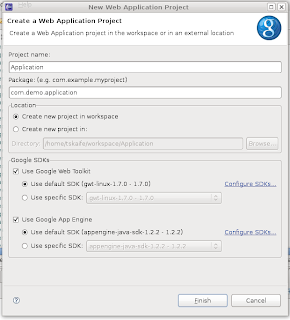
Create a pom for your project:
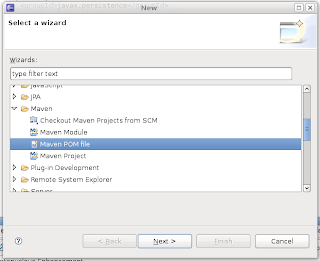
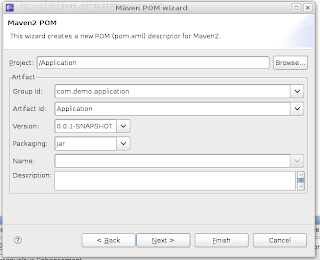
Edit the pom to look like this (profiles and resource filtering are definitely not needed and can be removed) and add any other jars you may need for your project:
You'll have to install some of the jars into maven manually, they aren't really keeping up to date with these things. For the datanucleus-appengine-1.0.2.final.jar you have to use the one that was placed in the lib folder and run this command
mvn install:install-file -DgroupId=com.google.appengine.orm -DartifactId=datanucleus-appengine -Dversion=1.0.2.final -Dpackaging=jar -Dfile=/path/to/file
At this time I would enable maven (I got some error message but just hit ok):
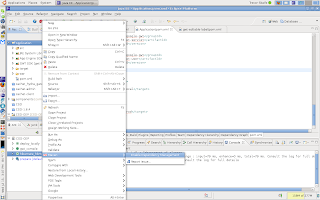
If you are using profiles (you probably have an error in your project at this point) tell maven which active profile to use:
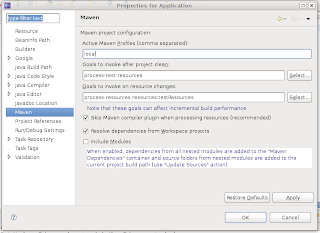
You'll get a message if you want maven to update your project, hit ok.
You're done, just ignore the warning about the missing gwt-servlet.jar, it will be there, just named differently.
now we just need to make an ant build.xml to make compiling, and deploying easy.
then our local.properties file needs to look something like this
Once that is done you need to run "ant java_compile" to copy the jars into the war/WEB-INF/lib folder. And every time you change the dependencies you'd want to run "ant java_compile"
Now if you ever want to simply create a war file without using eclipse you can just run "ant create_war"
Prerequisites:
Eclipse 3.4
Google Eclipse Plugin
m2eclipse plugin
Create your gwt project:

Create a pom for your project:


Edit the pom to look like this (profiles and resource filtering are definitely not needed and can be removed) and add any other jars you may need for your project:
<project xmlns="http://maven.apache.org/POM/4.0.0" xmlns:xsi="http://www.w3.org/2001/XMLSchema-instance"
xsi:schemaLocation="http://maven.apache.org/POM/4.0.0 http://maven.apache.org/maven-v4_0_0.xsd">
<modelVersion>4.0.0</modelVersion>
<groupId>com.demo.application</groupId>
<artifactId>Application</artifactId>
<version>0.0.1-SNAPSHOT</version>
<build>
<sourceDirectory>src</sourceDirectory>
<outputDirectory>war/WEB-INF/classes</outputDirectory>
<testSourceDirectory>test</testSourceDirectory>
<testOutputDirectory>target/test-classes</testOutputDirectory>
<resources>
<resource>
<filtering>true</filtering>
<directory>src</directory>
<includes>
<!--
This will include all files in the root source like
log4j.properties or applicationContext.xml
-->
<include>*.*</include>
<!--
This will include all files in client: 1. so this project can be
inherited by another project (needs java files) 2. will include
image files for image bundles
-->
<include>**/client/**</include>
<!-- This will include any css and image files in the public folder -->
<include>**/public/**</include>
<include>**/*.gwt.xml</include>
</includes>
</resource>
</resources>
<filters>
<!--
This tells which file to use for filtering, ${target} gets replaced
by the target property specified in your profile
-->
<filter>src/${target}.properties</filter>
</filters>
<plugins>
<plugin>
<artifactId>maven-compiler-plugin</artifactId>
<configuration>
<source>1.5</source>
<target>1.5</target>
<encoding>UTF-8</encoding>
</configuration>
</plugin>
<plugin>
<!--
This plugin will copy dependencies into the right outputDirectory
-->
<groupId>org.apache.maven.plugins</groupId>
<artifactId>maven-dependency-plugin</artifactId>
<configuration>
<outputDirectory>war/WEB-INF/lib</outputDirectory>
<overWriteReleases>true</overWriteReleases>
<overWriteSnapshots>true</overWriteSnapshots>
<overWriteIfNewer>true</overWriteIfNewer>
</configuration>
<executions>
<execution>
<id>copy-dependencies</id>
<phase>package</phase>
<goals>
<goal>copy-dependencies</goal>
</goals>
</execution>
</executions>
</plugin>
<plugin>
<groupId>org.apache.maven.plugins</groupId>
<artifactId>maven-resources-plugin</artifactId>
<version>2.3</version>
<configuration>
<encoding>UTF-8</encoding>
</configuration>
</plugin>
</plugins>
</build>
<repositories>
<repository>
<id>google-maven-repository</id>
<name>Google Maven Repository</name>
<url>http://google-maven-repository.googlecode.com/svn/repository/</url>
</repository>
</repositories>
<dependencies>
<dependency>
<groupId>com.google.appengine</groupId>
<artifactId>appengine-api-1.0-sdk</artifactId>
<version>1.2.1</version>
</dependency>
<dependency>
<groupId>com.google.appengine.orm</groupId>
<artifactId>datanucleus-appengine</artifactId>
<version>1.0.2.final</version>
</dependency>
<dependency>
<groupId>org.datanucleus</groupId>
<artifactId>datanucleus-core</artifactId>
<version>1.1.0</version>
<exclusions>
<exclusion>
<groupId>javax.transaction</groupId>
<artifactId>transaction-api</artifactId>
</exclusion>
</exclusions>
</dependency>
<dependency>
<groupId>org.datanucleus</groupId>
<artifactId>datanucleus-jpa</artifactId>
<version>1.1.0</version>
</dependency>
<dependency>
<groupId>org.apache.geronimo.specs</groupId>
<artifactId>geronimo-jta_1.1_spec</artifactId>
<version>1.1.1</version>
</dependency>
<dependency>
<groupId>org.apache.geronimo.specs</groupId>
<artifactId>geronimo-jpa_3.0_spec</artifactId>
<version>1.1.1</version>
</dependency>
<dependency>
<groupId>com.google.gwt</groupId>
<artifactId>gwt-servlet</artifactId>
<version>1.7.0</version>
</dependency>
<dependency>
<groupId>com.google.gwt</groupId>
<artifactId>gwt-user</artifactId>
<version>1.7.0</version>
</dependency>
<dependency>
<groupId>javax.jdo</groupId>
<artifactId>jdo2-api</artifactId>
<version>2.3-ea</version>
<exclusions>
<exclusion>
<groupId>javax.transaction</groupId>
<artifactId>transaction-api</artifactId>
</exclusion>
</exclusions>
</dependency>
<dependency>
<groupId>javax.transaction</groupId>
<artifactId>jta</artifactId>
<version>1.1</version>
</dependency>
</dependencies>
<profiles>
<profile>
<id>local</id>
<properties>
<target>local</target>
</properties>
</profile>
<profile>
<id>prod</id>
<properties>
<target>prod</target>
</properties>
</profile>
</profiles>
</project>
You'll have to install some of the jars into maven manually, they aren't really keeping up to date with these things. For the datanucleus-appengine-1.0.2.final.jar you have to use the one that was placed in the lib folder and run this command
mvn install:install-file -DgroupId=com.google.appengine.orm -DartifactId=datanucleus-appengine -Dversion=1.0.2.final -Dpackaging=jar -Dfile=/path/to/file
At this time I would enable maven (I got some error message but just hit ok):

If you are using profiles (you probably have an error in your project at this point) tell maven which active profile to use:

You'll get a message if you want maven to update your project, hit ok.
You're done, just ignore the warning about the missing gwt-servlet.jar, it will be there, just named differently.
now we just need to make an ant build.xml to make compiling, and deploying easy.
<project name="Application" default="java_compile" basedir=".">
<property file="./src/local.properties" />
<target name="java_compile" description="Java compile, filter resources, copy jars">
<echo>Make sure you have set up Maven Executable in ./src/local.properties</echo>
<echo>Your mvn exe is set to ${MAVEN_EXEC}</echo>
<!-- process-resources filters the files in the resources directory and copies them to target/classes -->
<!-- dependency:copy-dependencies copies the dependencies to the target/dependency folder -->
<delete dir="war/WEB-INF/lib" />
<exec taskname="compile project" dir="${basedir}" executable="${MAVEN_EXEC}">
<arg line="clean process-resources compile dependency:copy-dependencies -P local" />
</exec>
</target>
<path id="project.class.path">
<pathelement location="war/WEB-INF/classes" />
<pathelement location="${gwt.sdk}/gwt-user.jar" />
<fileset dir="${gwt.sdk}" includes="gwt-dev*.jar" />
<!-- Add any additional non-server libs (such as JUnit) -->
<fileset dir="war/WEB-INF/lib" includes="**/*.jar" />
</path>
<target name="gwt_compile" description="GWT compile to JavaScript" depends="java_compile">
<java failonerror="true" fork="true" classname="com.google.gwt.dev.Compiler">
<classpath>
<pathelement location="src" />
<path refid="project.class.path" />
</classpath>
<!-- add jvmarg -Xss16M or similar if you see a StackOverflowError -->
<jvmarg line="-Xmx512M" />
<!-- Additional arguments like -style PRETTY or -logLevel DEBUG -->
<arg value="com.demo.application.Application" />
</java>
</target>
<target name="create_war" depends="gwt_compile">
<echo>Creating the war file in target/Application.war</echo>
<zip destfile="target/Application.war" basedir="war" encoding="UTF8"/>
</target>
</project>
then our local.properties file needs to look something like this
gwt.sdk=/path/to/gwt-os-1.7.0
MAVEN_EXEC=/path/to/mvn.exe
Once that is done you need to run "ant java_compile" to copy the jars into the war/WEB-INF/lib folder. And every time you change the dependencies you'd want to run "ant java_compile"
Now if you ever want to simply create a war file without using eclipse you can just run "ant create_war"
Maven, GWT, and Eclipse round 2
So I've definitely made some progress in the Maven, GWT, and Eclipse integration. Below would be a working sample starting from a GWT project started using the google eclipse plugin.
Prerequisites:
Eclipse 3.4
Google Eclipse Plugin
m2eclipse plugin
Create your gwt project:

Create a pom for your project:


Edit the pom to look like this (profiles and resource filtering are definitely not needed and can be removed) and add any other jars you may need for your project:
You'll have to install some of the jars into maven manually, they aren't really keeping up to date with these things. For the datanucleus-appengine-1.0.2.final.jar you have to use the one that was placed in the lib folder and run this command
mvn install:install-file -DgroupId=com.google.appengine.orm -DartifactId=datanucleus-appengine -Dversion=1.0.2.final -Dpackaging=jar -Dfile=/path/to/file
At this time I would enable maven (I got some error message but just hit ok):

If you are using profiles (you probably have an error in your project at this point) tell maven which active profile to use:

You'll get a message if you want maven to update your project, hit ok.
You're done, just ignore the warning about the missing gwt-servlet.jar, it will be there, just named differently.
now we just need to make an ant build.xml to make compiling, and deploying easy.
then our local.properties file needs to look something like this
Once that is done you need to run "ant java_compile" to copy the jars into the war/WEB-INF/lib folder. And every time you change the dependencies you'd want to run "ant java_compile"
Now if you ever want to simply create a war file without using eclipse you can just run "ant create_war"
Prerequisites:
Eclipse 3.4
Google Eclipse Plugin
m2eclipse plugin
Create your gwt project:

Create a pom for your project:


Edit the pom to look like this (profiles and resource filtering are definitely not needed and can be removed) and add any other jars you may need for your project:
<project xmlns="http://maven.apache.org/POM/4.0.0" xmlns:xsi="http://www.w3.org/2001/XMLSchema-instance"
xsi:schemaLocation="http://maven.apache.org/POM/4.0.0 http://maven.apache.org/maven-v4_0_0.xsd">
<modelVersion>4.0.0</modelVersion>
<groupId>com.demo.application</groupId>
<artifactId>Application</artifactId>
<version>0.0.1-SNAPSHOT</version>
<build>
<sourceDirectory>src</sourceDirectory>
<outputDirectory>war/WEB-INF/classes</outputDirectory>
<testSourceDirectory>test</testSourceDirectory>
<testOutputDirectory>target/test-classes</testOutputDirectory>
<resources>
<resource>
<filtering>true</filtering>
<directory>src</directory>
<includes>
<!--
This will include all files in the root source like
log4j.properties or applicationContext.xml
-->
<include>*.*</include>
<!--
This will include all files in client: 1. so this project can be
inherited by another project (needs java files) 2. will include
image files for image bundles
-->
<include>**/client/**</include>
<!-- This will include any css and image files in the public folder -->
<include>**/public/**</include>
<include>**/*.gwt.xml</include>
</includes>
</resource>
</resources>
<filters>
<!--
This tells which file to use for filtering, ${target} gets replaced
by the target property specified in your profile
-->
<filter>src/${target}.properties</filter>
</filters>
<plugins>
<plugin>
<artifactId>maven-compiler-plugin</artifactId>
<configuration>
<source>1.5</source>
<target>1.5</target>
<encoding>UTF-8</encoding>
</configuration>
</plugin>
<plugin>
<!--
This plugin will copy dependencies into the right outputDirectory
-->
<groupId>org.apache.maven.plugins</groupId>
<artifactId>maven-dependency-plugin</artifactId>
<configuration>
<outputDirectory>war/WEB-INF/lib</outputDirectory>
<overWriteReleases>true</overWriteReleases>
<overWriteSnapshots>true</overWriteSnapshots>
<overWriteIfNewer>true</overWriteIfNewer>
</configuration>
<executions>
<execution>
<id>copy-dependencies</id>
<phase>package</phase>
<goals>
<goal>copy-dependencies</goal>
</goals>
</execution>
</executions>
</plugin>
<plugin>
<groupId>org.apache.maven.plugins</groupId>
<artifactId>maven-resources-plugin</artifactId>
<version>2.3</version>
<configuration>
<encoding>UTF-8</encoding>
</configuration>
</plugin>
</plugins>
</build>
<repositories>
<repository>
<id>google-maven-repository</id>
<name>Google Maven Repository</name>
<url>http://google-maven-repository.googlecode.com/svn/repository/</url>
</repository>
</repositories>
<dependencies>
<dependency>
<groupId>com.google.appengine</groupId>
<artifactId>appengine-api-1.0-sdk</artifactId>
<version>1.2.1</version>
</dependency>
<dependency>
<groupId>com.google.appengine.orm</groupId>
<artifactId>datanucleus-appengine</artifactId>
<version>1.0.2.final</version>
</dependency>
<dependency>
<groupId>org.datanucleus</groupId>
<artifactId>datanucleus-core</artifactId>
<version>1.1.0</version>
<exclusions>
<exclusion>
<groupId>javax.transaction</groupId>
<artifactId>transaction-api</artifactId>
</exclusion>
</exclusions>
</dependency>
<dependency>
<groupId>org.datanucleus</groupId>
<artifactId>datanucleus-jpa</artifactId>
<version>1.1.0</version>
</dependency>
<dependency>
<groupId>org.apache.geronimo.specs</groupId>
<artifactId>geronimo-jta_1.1_spec</artifactId>
<version>1.1.1</version>
</dependency>
<dependency>
<groupId>org.apache.geronimo.specs</groupId>
<artifactId>geronimo-jpa_3.0_spec</artifactId>
<version>1.1.1</version>
</dependency>
<dependency>
<groupId>com.google.gwt</groupId>
<artifactId>gwt-servlet</artifactId>
<version>1.7.0</version>
</dependency>
<dependency>
<groupId>com.google.gwt</groupId>
<artifactId>gwt-user</artifactId>
<version>1.7.0</version>
</dependency>
<dependency>
<groupId>javax.jdo</groupId>
<artifactId>jdo2-api</artifactId>
<version>2.3-ea</version>
<exclusions>
<exclusion>
<groupId>javax.transaction</groupId>
<artifactId>transaction-api</artifactId>
</exclusion>
</exclusions>
</dependency>
<dependency>
<groupId>javax.transaction</groupId>
<artifactId>jta</artifactId>
<version>1.1</version>
</dependency>
</dependencies>
<profiles>
<profile>
<id>local</id>
<properties>
<target>local</target>
</properties>
</profile>
<profile>
<id>prod</id>
<properties>
<target>prod</target>
</properties>
</profile>
</profiles>
</project>
You'll have to install some of the jars into maven manually, they aren't really keeping up to date with these things. For the datanucleus-appengine-1.0.2.final.jar you have to use the one that was placed in the lib folder and run this command
mvn install:install-file -DgroupId=com.google.appengine.orm -DartifactId=datanucleus-appengine -Dversion=1.0.2.final -Dpackaging=jar -Dfile=/path/to/file
At this time I would enable maven (I got some error message but just hit ok):

If you are using profiles (you probably have an error in your project at this point) tell maven which active profile to use:

You'll get a message if you want maven to update your project, hit ok.
You're done, just ignore the warning about the missing gwt-servlet.jar, it will be there, just named differently.
now we just need to make an ant build.xml to make compiling, and deploying easy.
<project name="Application" default="java_compile" basedir=".">
<property file="./src/local.properties" />
<target name="java_compile" description="Java compile, filter resources, copy jars">
<echo>Make sure you have set up Maven Executable in ./src/local.properties</echo>
<echo>Your mvn exe is set to ${MAVEN_EXEC}</echo>
<!-- process-resources filters the files in the resources directory and copies them to target/classes -->
<!-- dependency:copy-dependencies copies the dependencies to the target/dependency folder -->
<delete dir="war/WEB-INF/lib" />
<exec taskname="compile project" dir="${basedir}" executable="${MAVEN_EXEC}">
<arg line="clean process-resources compile dependency:copy-dependencies -P local" />
</exec>
</target>
<path id="project.class.path">
<pathelement location="war/WEB-INF/classes" />
<pathelement location="${gwt.sdk}/gwt-user.jar" />
<fileset dir="${gwt.sdk}" includes="gwt-dev*.jar" />
<!-- Add any additional non-server libs (such as JUnit) -->
<fileset dir="war/WEB-INF/lib" includes="**/*.jar" />
</path>
<target name="gwt_compile" description="GWT compile to JavaScript" depends="java_compile">
<java failonerror="true" fork="true" classname="com.google.gwt.dev.Compiler">
<classpath>
<pathelement location="src" />
<path refid="project.class.path" />
</classpath>
<!-- add jvmarg -Xss16M or similar if you see a StackOverflowError -->
<jvmarg line="-Xmx512M" />
<!-- Additional arguments like -style PRETTY or -logLevel DEBUG -->
<arg value="com.demo.application.Application" />
</java>
</target>
<target name="create_war" depends="gwt_compile">
<echo>Creating the war file in target/Application.war</echo>
<zip destfile="target/Application.war" basedir="war" encoding="UTF8"/>
</target>
</project>
then our local.properties file needs to look something like this
gwt.sdk=/path/to/gwt-os-1.7.0
MAVEN_EXEC=/path/to/mvn.exe
Once that is done you need to run "ant java_compile" to copy the jars into the war/WEB-INF/lib folder. And every time you change the dependencies you'd want to run "ant java_compile"
Now if you ever want to simply create a war file without using eclipse you can just run "ant create_war"
Getting GWT working from SVN
1) check out the project from SVN
2) run ant to download the Maven2 dependencies locally and copy them
to the war/WEB-INF/lib
3) refresh Eclipse project so it knows that new jars are there
4) remove jars from Project -> Properties -> Java Build Path
5) add all jars from the war/WEB-INF/lib to make sure Eclipse knows
the exact set of jars the pom.xml had
2) run ant to download the Maven2 dependencies locally and copy them
to the war/WEB-INF/lib
3) refresh Eclipse project so it knows that new jars are there
4) remove jars from Project -> Properties -> Java Build Path
5) add all jars from the war/WEB-INF/lib to make sure Eclipse knows
the exact set of jars the pom.xml had
Installing the "photo carousel" jar using Maven 2
The Photo Carousel is one of the cool GWT widget that our team (Jordan Beck and Brandon Wong) developed, check it out:
Using Maven2 to manage dependencies is important for large teams and large number of dependencies, with source control system.
If you work alone, just copy the jar in the lib folder.
1. Download the latest jar from:
2. Open Terminal and cd to your download location
3. Add dependency to your pom.xml
Using Terminal:
~/Downloads $ mvn install:install-file -DgroupId=com.reveregroup.gwt -DartifactId=gwt-photo-carousel-with-drawer -Dversion=1.0.0 -Dpackaging=jar -Dfile=carousel.jar
<dependency>
<groupId>com.reveregroup.gwt</groupId>
<artifactId>gwt-photo-carousel-with-drawer</artifactId>
<version>1.0.0</version>
</dependency>
Using Eclipse:

4. Run Ant task "copy_jars" to get jars into the war:
<target name="copy_jars" depends="x_copy_filtered_resources">
<delete dir="${GOOGLE_WAR}\\WEB-INF\\lib" />
<copy todir="${GOOGLE_WAR}\\WEB-INF\\lib">
<fileset dir="${MAVEN_TARGET}\\dependency" />
</copy>
</target>
<target name="x_copy_filtered_resources" depends="x_maven_filter_copy_dependencies">
<copy todir="${GOOGLE_SRC}">
<fileset dir="${MAVEN_TARGET}\\classes" />
</copy>
</target>
<target name="x_maven_filter_copy_dependencies">
<echo>Maven Executable: ${MAVEN_EXEC}</echo>
<exec taskname="mvn war" dir="${basedir}"
executable="${MAVEN_EXEC}">
<arg line="clean resources:resources dependency:copy-dependencies -Dtarget=${TARGET}" />
</exec>
<delete file=".\\target\\csd.war" />
</target>
5. Verify results:

6. Add jars to your project classpath:

GWT 1.6.4 maven and google eclipse plugin
Uki and I wanted to switch our application to using GWT 1.6.4, still use maven for our dependencies, and be able to use the google eclipse plugin to run our gwt application from. By no means have we even come close to making a perfect solution, but it is a start.
1. Create a new web application project using google's eclipse plugin.
2. Create a folder called maven/resources (we use this for resource filtering).
3. Create a pom.xml that looks something like this (we run this using ant and don't use the eclipse plugin):
4. Create a build.xml file that looks like this:
5. Remove from the war/WEB-INF/lib folder the gwt-servlet.jar that the google eclipse plugin (gep) added for you automatically.
6. Run ant (ignore any errors about a missing web.xml file, we will update the pom and build files later to hopefully get rid of this issue).
7. Edit the projects build path, project > properties > Java Build Path > Libraries, and add all of the jars in the war/WEB-INF/lib folder.
8. Run the project as a google Web Application, Run > Run As > Web Application.
Every time you add/remove dependencies to your pom you must rerun the ant task and add/remove those jars from your build path.
Also if you change any files in the maven/resources folder you must rerun the ant task.
I definitely don't like having a seperate folder to keep my resource files that have to be filtered, and I also don't like that we have to use ant to run maven to basically just copy the jars into the right folder, then to add them to the build path. But at least it runs using google's eclipse plugin as well as being able to somewhat use maven for the dependencies.
1. Create a new web application project using google's eclipse plugin.
2. Create a folder called maven/resources (we use this for resource filtering).
3. Create a pom.xml that looks something like this (we run this using ant and don't use the eclipse plugin):
<project xmlns="http://maven.apache.org/POM/4.0.0" xsi="http://www.w3.org/2001/XMLSchema-instance" schemalocation="http://maven.apache.org/POM/4.0.0 http://maven.apache.org/maven-v4_0_0.xsd">
<modelversion>4.0.0</modelversion>
<groupid>Application</groupid>
<artifactid>Application</artifactid>
<version>1.0</version>
<build>
<resources>
<resource>
<filtering>true</filtering>
<directory>maven/resources</directory>
<excludes>
<exclude>*.properties</exclude>
</excludes>
</resource>
</resources>
<filters>
<filter>maven/resources/${target}.properties</filter>
</filters>
</build>
<dependencies>
<dependency>
<groupid>com.google.gwt</groupid>
<artifactid>gwt-servlet</artifactid>
<version>1.6.4</version>
</dependency>
<dependency>
<groupid>com.google.gwt</groupid>
<artifactid>gwt-user</artifactid>
<version>1.6.4</version>
</dependency>
</dependencies>
</project>
4. Create a build.xml file that looks like this:
<project name="Application" default="copy_jars" basedir=".">
<property name="GOOGLE_WAR_LIB" value=".\\war\\WEB-INF\\lib">
<property name="MAVEN_TARGET_JARS" value=".\\target\\Application-1.0\\WEB-INF\\lib">
<property name="GOOGLE_SRC" value=".\\src">
<property name="MAVEN_TARGET_RESOURCES" value=".\\target\\classes">
<property file=".\\maven\\resources\\${user.name}.properties">
<target name="maven_war">
<echo>Maven Executable: ${MAVEN_EXEC}</echo>
<exec taskname="mvn war" dir="${basedir}" executable="${MAVEN_EXEC}">
<arg line="clean resources:resources war:war -Dtarget=${TARGET}">
</arg>
<delete file=".\\target\\csd.war">
</delete>
<target name="copy_jars" depends="'copy_filtered_resources'">
<copy todir="${GOOGLE_WAR_LIB}">
<fileset dir="${MAVEN_TARGET_JARS}">
</fileset>
</copy>
<target name="copy_filtered_resources" depends="'maven_war'">
<copy todir="${GOOGLE_SRC}">
<fileset dir="${MAVEN_TARGET_RESOURCES}">
</fileset>
</copy>
</project>
5. Remove from the war/WEB-INF/lib folder the gwt-servlet.jar that the google eclipse plugin (gep) added for you automatically.
6. Run ant (ignore any errors about a missing web.xml file, we will update the pom and build files later to hopefully get rid of this issue).
7. Edit the projects build path, project > properties > Java Build Path > Libraries, and add all of the jars in the war/WEB-INF/lib folder.
8. Run the project as a google Web Application, Run > Run As > Web Application.
Every time you add/remove dependencies to your pom you must rerun the ant task and add/remove those jars from your build path.
Also if you change any files in the maven/resources folder you must rerun the ant task.
I definitely don't like having a seperate folder to keep my resource files that have to be filtered, and I also don't like that we have to use ant to run maven to basically just copy the jars into the right folder, then to add them to the build path. But at least it runs using google's eclipse plugin as well as being able to somewhat use maven for the dependencies.
GWT 1.6.4 maven and google eclipse plugin
Uki and I wanted to switch our application to using GWT 1.6.4, still use maven for our dependencies, and be able to use the google eclipse plugin to run our gwt application from. By no means have we even come close to making a perfect solution, but it is a start.
1. Create a new web application project using google's eclipse plugin.
2. Create a folder called maven/resources (we use this for resource filtering).
3. Create a pom.xml that looks something like this (we run this using ant and don't use the eclipse plugin):
4. Create a build.xml file that looks like this:
5. Remove from the war/WEB-INF/lib folder the gwt-servlet.jar that the google eclipse plugin (gep) added for you automatically.
6. Run ant (ignore any errors about a missing web.xml file, we will update the pom and build files later to hopefully get rid of this issue).
7. Edit the projects build path, project > properties > Java Build Path > Libraries, and add all of the jars in the war/WEB-INF/lib folder.
8. Run the project as a google Web Application, Run > Run As > Web Application.
Every time you add/remove dependencies to your pom you must rerun the ant task and add/remove those jars from your build path.
Also if you change any files in the maven/resources folder you must rerun the ant task.
I definitely don't like having a seperate folder to keep my resource files that have to be filtered, and I also don't like that we have to use ant to run maven to basically just copy the jars into the right folder, then to add them to the build path. But at least it runs using google's eclipse plugin as well as being able to somewhat use maven for the dependencies.
1. Create a new web application project using google's eclipse plugin.
2. Create a folder called maven/resources (we use this for resource filtering).
3. Create a pom.xml that looks something like this (we run this using ant and don't use the eclipse plugin):
<project xmlns="http://maven.apache.org/POM/4.0.0" xsi="http://www.w3.org/2001/XMLSchema-instance" schemalocation="http://maven.apache.org/POM/4.0.0 http://maven.apache.org/maven-v4_0_0.xsd">
<modelversion>4.0.0</modelversion>
<groupid>Application</groupid>
<artifactid>Application</artifactid>
<version>1.0</version>
<build>
<resources>
<resource>
<filtering>true</filtering>
<directory>maven/resources</directory>
<excludes>
<exclude>*.properties</exclude>
</excludes>
</resource>
</resources>
<filters>
<filter>maven/resources/${target}.properties</filter>
</filters>
</build>
<dependencies>
<dependency>
<groupid>com.google.gwt</groupid>
<artifactid>gwt-servlet</artifactid>
<version>1.6.4</version>
</dependency>
<dependency>
<groupid>com.google.gwt</groupid>
<artifactid>gwt-user</artifactid>
<version>1.6.4</version>
</dependency>
</dependencies>
</project>
4. Create a build.xml file that looks like this:
<project name="Application" default="copy_jars" basedir=".">
<property name="GOOGLE_WAR_LIB" value=".\\war\\WEB-INF\\lib">
<property name="MAVEN_TARGET_JARS" value=".\\target\\Application-1.0\\WEB-INF\\lib">
<property name="GOOGLE_SRC" value=".\\src">
<property name="MAVEN_TARGET_RESOURCES" value=".\\target\\classes">
<property file=".\\maven\\resources\\${user.name}.properties">
<target name="maven_war">
<echo>Maven Executable: ${MAVEN_EXEC}</echo>
<exec taskname="mvn war" dir="${basedir}" executable="${MAVEN_EXEC}">
<arg line="clean resources:resources war:war -Dtarget=${TARGET}">
</arg>
<delete file=".\\target\\csd.war">
</delete>
<target name="copy_jars" depends="'copy_filtered_resources'">
<copy todir="${GOOGLE_WAR_LIB}">
<fileset dir="${MAVEN_TARGET_JARS}">
</fileset>
</copy>
<target name="copy_filtered_resources" depends="'maven_war'">
<copy todir="${GOOGLE_SRC}">
<fileset dir="${MAVEN_TARGET_RESOURCES}">
</fileset>
</copy>
</project>
5. Remove from the war/WEB-INF/lib folder the gwt-servlet.jar that the google eclipse plugin (gep) added for you automatically.
6. Run ant (ignore any errors about a missing web.xml file, we will update the pom and build files later to hopefully get rid of this issue).
7. Edit the projects build path, project > properties > Java Build Path > Libraries, and add all of the jars in the war/WEB-INF/lib folder.
8. Run the project as a google Web Application, Run > Run As > Web Application.
Every time you add/remove dependencies to your pom you must rerun the ant task and add/remove those jars from your build path.
Also if you change any files in the maven/resources folder you must rerun the ant task.
I definitely don't like having a seperate folder to keep my resource files that have to be filtered, and I also don't like that we have to use ant to run maven to basically just copy the jars into the right folder, then to add them to the build path. But at least it runs using google's eclipse plugin as well as being able to somewhat use maven for the dependencies.
GWT 1.6.4 and Maven 2 integration
There is a nice article on the subject:
However, we are working on different solution that integrates closer, stand by for updates.
GWT 1.6.4 and Maven 2 integration
There is a nice article on the subject:
However, we are working on different solution that integrates closer, stand by for updates.
Eclipse Ganymede J2EE: Maven2 Plugin
I had hard time installing all Maven2 plugin features, so I selected only few required:

Eclipse Ganymede J2EE: Maven2 Plugin
I had hard time installing all Maven2 plugin features, so I selected only few required:

Eclipse Ganymede J2EE plugins
I noticed that I have problems installing plugins after I restart the Eclipse (Update Manager changes) so i have to install them all in one shot without restart:
SVN:
http://subclipse.tigris.org/update_1.6.x
Google AppEngine:

Google AppEngine:
http://dl.google.com/eclipse/plugin/3.4
Maven2:
http://m2eclipse.sonatype.org/update/
I actually had to delete the eclipse folder and expand it from the tar, then I install all plugins each time saying NO to restart of Eclipse. After the last plugin installation I restart the Eclipse and all works fine.
Eclipse Ganymede J2EE plugins
I noticed that I have problems installing plugins after I restart the Eclipse (Update Manager changes) so i have to install them all in one shot without restart:
SVN:
http://subclipse.tigris.org/update_1.6.x
Google AppEngine:

Google AppEngine:
http://dl.google.com/eclipse/plugin/3.4
Maven2:
http://m2eclipse.sonatype.org/update/
I actually had to delete the eclipse folder and expand it from the tar, then I install all plugins each time saying NO to restart of Eclipse. After the last plugin installation I restart the Eclipse and all works fine.
Adding maven and SVN plugin to Eclipse 2.4.2
To add maven plugin:
Go Help menu in your Eclipse IDE
Select Software Updates
Click on Add Site and enter http://m2eclipse.sonatype.org/update/
To add SVN plugin:
Go Help menu in your Eclipse IDE
Select Software Updates
Click on Add Site and enter http://subclipse.tigris.org/update_1.4.x
To see your SVN repository view, go to Window menu
Select Show View and select SVN Repository
Adding maven and SVN plugin to Eclipse 2.4.2
To add maven plugin:
Go Help menu in your Eclipse IDE
Select Software Updates
Click on Add Site and enter http://m2eclipse.sonatype.org/update/
To add SVN plugin:
Go Help menu in your Eclipse IDE
Select Software Updates
Click on Add Site and enter http://subclipse.tigris.org/update_1.4.x
To see your SVN repository view, go to Window menu
Select Show View and select SVN Repository
GILEAD replaces Hibernate4GWT
Background information:
http://noon.gilead.free.fr/gilead/index.php?page=f-a-q
2) replace in XYZ.gwt.xml
<inherits name="net.sf.hibernate4gwt.Hibernate4Gwt15" />
http://noon.gilead.free.fr/gilead/index.php?page=f-a-q
1) Download ZIP:
http://sourceforge.net/project/showfiles.php?group_id=239931&package_id=291834&release_id=639455
Import jar files into Maven2 repo:
mvn install:install-file -DgroupId=net.sf.gilead -DartifactId=adapter-core -Dversion=1.2.0.29 -Dpackaging=jar -Dfile=*download location*/gilead-1.2.0.29/dist/adapter-core-1.2.0.29.jar
mvn install:install-file -DgroupId=net.sf.gilead -DartifactId=adapter4gwt -Dversion=1.2.0.29 -Dpackaging=jar -Dfile=*download location*/gilead-1.2.0.29/dist/adapter4gwt-1.2.0.29.jar
mvn install:install-file -DgroupId=net.sf.gilead -DartifactId=hibernate-util -Dversion=1.2.0.29 -Dpackaging=jar -Dfile=*download location*/gilead-1.2.0.29/dist/hibernate-util-1.2.0.29.jar
mvn install:install-file -DgroupId=net.sf.beanlib -DartifactId=beanlib -Dversion=3.3.0beta21 -Dpackaging=jar -Dfile=*download location*/gilead-1.2.0.29/adapter-core/lib/beanlib-3.3.0beta21b.jar
mvn install:install-file -DgroupId=net.sf.beanlib -DartifactId=beanlib-hibernate -Dversion=3.3.0beta21 -Dpackaging=jar -Dfile=*download location*/gilead-1.2.0.29/adapter-core/lib/beanlib-hibernate-3.3.0beta21b.jar
2) replace in XYZ.gwt.xml
<inherits name="net.sf.hibernate4gwt.Hibernate4Gwt15" />
with
<inherits name="net.sf.gilead.Adapter4Gwt15" />
3) replace LazyPojo with LightEntity
import net.sf.hibernate4gwt.pojo.java5.LazyPojo;
public class BaseDTO extends LazyPojo
with
import net.sf.gilead.pojo.java5.LightEntity;
public class BaseDTO extends LightEntity
4) replace
import net.sf.hibernate4gwt.core.HibernateBeanManager;
import net.sf.hibernate4gwt.gwt.HibernateRemoteService;
public class SomeClassImpl extends HibernateRemoteService
with
import net.sf.gilead.core.PersistentBeanManager;
import net.sf.gilead.gwt.PersistentRemoteService;
public class SomeClassImpl extends PersistentRemoteService
5) change how you get the beans:
ApplicationContextFactory application = ApplicationContextFactory.getInstance();
setBeanManager((PersistentBeanManager) application.getBean("hibernateBeanManager"));
addressDao = (AddressDao) application.getBean("addressDao");
It also seems like there were some issues with merging arrays that was
fixed in the 1.1.1 version of hibernate4gwt http://hibernate4gwt.sourceforge.net/news.html
We have had some issues with merging objects that contain Lists or
Sets of other objects and getting classcastexception errors. hopefully
going to the new version will fix these issues.
GILEAD replaces Hibernate4GWT
Background information:
http://noon.gilead.free.fr/gilead/index.php?page=f-a-q
2) replace in XYZ.gwt.xml
<inherits name="net.sf.hibernate4gwt.Hibernate4Gwt15" />
http://noon.gilead.free.fr/gilead/index.php?page=f-a-q
1) Download ZIP:
http://sourceforge.net/project/showfiles.php?group_id=239931&package_id=291834&release_id=639455
Import jar files into Maven2 repo:
mvn install:install-file -DgroupId=net.sf.gilead -DartifactId=adapter-core -Dversion=1.2.0.29 -Dpackaging=jar -Dfile=*download location*/gilead-1.2.0.29/dist/adapter-core-1.2.0.29.jar
mvn install:install-file -DgroupId=net.sf.gilead -DartifactId=adapter4gwt -Dversion=1.2.0.29 -Dpackaging=jar -Dfile=*download location*/gilead-1.2.0.29/dist/adapter4gwt-1.2.0.29.jar
mvn install:install-file -DgroupId=net.sf.gilead -DartifactId=hibernate-util -Dversion=1.2.0.29 -Dpackaging=jar -Dfile=*download location*/gilead-1.2.0.29/dist/hibernate-util-1.2.0.29.jar
mvn install:install-file -DgroupId=net.sf.beanlib -DartifactId=beanlib -Dversion=3.3.0beta21 -Dpackaging=jar -Dfile=*download location*/gilead-1.2.0.29/adapter-core/lib/beanlib-3.3.0beta21b.jar
mvn install:install-file -DgroupId=net.sf.beanlib -DartifactId=beanlib-hibernate -Dversion=3.3.0beta21 -Dpackaging=jar -Dfile=*download location*/gilead-1.2.0.29/adapter-core/lib/beanlib-hibernate-3.3.0beta21b.jar
2) replace in XYZ.gwt.xml
<inherits name="net.sf.hibernate4gwt.Hibernate4Gwt15" />
with
<inherits name="net.sf.gilead.Adapter4Gwt15" />
3) replace LazyPojo with LightEntity
import net.sf.hibernate4gwt.pojo.java5.LazyPojo;
public class BaseDTO extends LazyPojo
with
import net.sf.gilead.pojo.java5.LightEntity;
public class BaseDTO extends LightEntity
4) replace
import net.sf.hibernate4gwt.core.HibernateBeanManager;
import net.sf.hibernate4gwt.gwt.HibernateRemoteService;
public class SomeClassImpl extends HibernateRemoteService
with
import net.sf.gilead.core.PersistentBeanManager;
import net.sf.gilead.gwt.PersistentRemoteService;
public class SomeClassImpl extends PersistentRemoteService
5) change how you get the beans:
ApplicationContextFactory application = ApplicationContextFactory.getInstance();
setBeanManager((PersistentBeanManager) application.getBean("hibernateBeanManager"));
addressDao = (AddressDao) application.getBean("addressDao");
It also seems like there were some issues with merging arrays that was
fixed in the 1.1.1 version of hibernate4gwt http://hibernate4gwt.sourceforge.net/news.html
We have had some issues with merging objects that contain Lists or
Sets of other objects and getting classcastexception errors. hopefully
going to the new version will fix these issues.
Running a single test class with Maven2
workspace/csd $ mvn test -Dtest=com.ucc.csd.server.PhraseGeneratorTest
Subscribe to:
Posts (Atom)