Showing posts with label mvn. Show all posts

Java: running with Maven


Compiling with Maven

note:

  • mvn clean install
  • location of created jar


uki@ WebSocketClientServer $ mvn clean install

[INFO] Scanning for projects...

[INFO]                                                                         

[INFO] ------------------------------------------------------------------------

[INFO] Building WebSocket-GlassFish 1.0-SNAPSHOT

[INFO] ------------------------------------------------------------------------

...

.to /Users/uki/.m2/repository/edu/clcillinois/cit137/WebSocket-GlassFish/1.0-SNAPSHOT/WebSocket-GlassFish-1.0-SNAPSHOT-jar-with-dependencies.jar

[INFO] ------------------------------------------------------------------------

[INFO] BUILD SUCCESS

[INFO] ------------------------------------------------------------------------


Using variables to store long values


uki@ ~ $ export WEBSOCKET_JAR=~/.m2/repository/edu/clcillinois/cit137/WebSocket-GlassFish/1.0-SNAPSHOT/WebSocket-GlassFish-1.0-SNAPSHOT-jar-with-dependencies.jaruki@ ~ $ echo $WEBSOCKET_JAR/Users/uki/.m2/repository/edu/clcillinois/cit137/WebSocket-GlassFish/1.0-SNAPSHOT/WebSocket-GlassFish-1.0-SNAPSHOT-jar-with-dependencies.jar


Starting SERVER


$ java -cp $WEBSOCKET_JAR edu.clcillinois.websocket.server.WebSocketServer -h localhost -p 8025


Setting homeName to: localhostStarting the server.Mar 03, 2015 3:56:54 PM org.glassfish.tyrus.server.ServerContainerFactory createINFO: Provider class loaded: org.glassfish.tyrus.container.grizzly.GrizzlyEngineMar 03, 2015 3:56:54 PM org.glassfish.grizzly.http.server.NetworkListener startINFO: Started listener bound to [0.0.0.0:8025]Mar 03, 2015 3:56:54 PM org.glassfish.grizzly.http.server.HttpServer startINFO: [HttpServer] Started.Mar 03, 2015 3:56:54 PM org.glassfish.tyrus.server.Server startINFO: WebSocket Registered apps: URLs all start with ws://localhost:8025Mar 03, 2015 3:56:54 PM org.glassfish.tyrus.server.Server startINFO: WebSocket server started.
Type 'q' and Enter to stop server: 


Starting Client(s)


uki@ CNH_PROD $ java -cp $WEBSOCKET_JAR edu.clcillinois.websocket.client.WebSocketClient -h localhost -p 8025
[DEBUG] 2015-03-03 16:02:44,354 edu.clcillinois.websocket.client.WebSocketClient main - Starting WebSockets clientSetting homeName to: localhost


Monitoring Java processes and Killing them


$ ps | grep java
30227 ttys001    0:00.00 grep java

30203 ttys002    0:01.37 /usr/bin/java -cp ~/.m2/repository/edu/clcillinois/cit137/xyz.jar edu.clcillinois.websocket.server.WebSocketServer -h localhost -p 8025

$ kill -9 30203 uki@ SimpleWebSocketServer $ ps | grep java30230 ttys001    0:00.00 grep java


Maven pom.xml example

note: 
  • group id
  • artifact id
  • version
  • start-class


Maven Dependencies


note:
  • group id
  • artifact id
  • version


Maven build


note: 
  • plugins 
  • Java version 1.6, 1.7 or 1.8
  • TODO change to Java 1.6 and observer what fails
  • jar with dependencies


As an Amazon Associate I earn from qualifying purchases.

Java: running with Maven


Compiling with Maven

note:

  • mvn clean install
  • location of created jar


uki@ WebSocketClientServer $ mvn clean install

[INFO] Scanning for projects...

[INFO]                                                                         

[INFO] ------------------------------------------------------------------------

[INFO] Building WebSocket-GlassFish 1.0-SNAPSHOT

[INFO] ------------------------------------------------------------------------

...

.to /Users/uki/.m2/repository/edu/clcillinois/cit137/WebSocket-GlassFish/1.0-SNAPSHOT/WebSocket-GlassFish-1.0-SNAPSHOT-jar-with-dependencies.jar

[INFO] ------------------------------------------------------------------------

[INFO] BUILD SUCCESS

[INFO] ------------------------------------------------------------------------


Using variables to store long values


uki@ ~ $ export WEBSOCKET_JAR=~/.m2/repository/edu/clcillinois/cit137/WebSocket-GlassFish/1.0-SNAPSHOT/WebSocket-GlassFish-1.0-SNAPSHOT-jar-with-dependencies.jaruki@ ~ $ echo $WEBSOCKET_JAR/Users/uki/.m2/repository/edu/clcillinois/cit137/WebSocket-GlassFish/1.0-SNAPSHOT/WebSocket-GlassFish-1.0-SNAPSHOT-jar-with-dependencies.jar


Starting SERVER


$ java -cp $WEBSOCKET_JAR edu.clcillinois.websocket.server.WebSocketServer -h localhost -p 8025


Setting homeName to: localhostStarting the server.Mar 03, 2015 3:56:54 PM org.glassfish.tyrus.server.ServerContainerFactory createINFO: Provider class loaded: org.glassfish.tyrus.container.grizzly.GrizzlyEngineMar 03, 2015 3:56:54 PM org.glassfish.grizzly.http.server.NetworkListener startINFO: Started listener bound to [0.0.0.0:8025]Mar 03, 2015 3:56:54 PM org.glassfish.grizzly.http.server.HttpServer startINFO: [HttpServer] Started.Mar 03, 2015 3:56:54 PM org.glassfish.tyrus.server.Server startINFO: WebSocket Registered apps: URLs all start with ws://localhost:8025Mar 03, 2015 3:56:54 PM org.glassfish.tyrus.server.Server startINFO: WebSocket server started.
Type 'q' and Enter to stop server: 


Starting Client(s)


uki@ CNH_PROD $ java -cp $WEBSOCKET_JAR edu.clcillinois.websocket.client.WebSocketClient -h localhost -p 8025
[DEBUG] 2015-03-03 16:02:44,354 edu.clcillinois.websocket.client.WebSocketClient main - Starting WebSockets clientSetting homeName to: localhost


Monitoring Java processes and Killing them


$ ps | grep java
30227 ttys001    0:00.00 grep java

30203 ttys002    0:01.37 /usr/bin/java -cp ~/.m2/repository/edu/clcillinois/cit137/xyz.jar edu.clcillinois.websocket.server.WebSocketServer -h localhost -p 8025

$ kill -9 30203 uki@ SimpleWebSocketServer $ ps | grep java30230 ttys001    0:00.00 grep java


Maven pom.xml example

note: 
  • group id
  • artifact id
  • version
  • start-class


Maven Dependencies


note:
  • group id
  • artifact id
  • version


Maven build


note: 
  • plugins 
  • Java version 1.6, 1.7 or 1.8
  • TODO change to Java 1.6 and observer what fails
  • jar with dependencies


As an Amazon Associate I earn from qualifying purchases.

Java: Unsupported major.minor version 52.0

This error basically means that you compiled your Java code with the version higher than that on the target machine you are trying to run it on.

 $ java -versionjava version "1.8.0_20-ea"


Java 1.8 == 8 == 52 (go figure why this confusion)

J2SE 8 = 52,
J2SE 7 = 51, 
J2SE 6.0 = 50, 
J2SE 5.0 = 49, 
JDK 1.4 = 48, 
JDK 1.3 = 47, 
JDK 1.2 = 46, 
JDK 1.1 = 45

Solution 1: update Java version on target machine (often impossible)
Solution 2: compile with lower Java version (skip on fancy language features e.g. lambdas) 

e.g. using Maven

   <build>
      <plugins>
         <plugin>
            <groupId>org.apache.maven.plugins</groupId>
            <artifactId>maven-compiler-plugin</artifactId>
            <version>3.2</version>
            <configuration>
               <!-- target has java version "1.7.0_60", to be safe we use 1.6  -->
               <source>1.6</source>
               <target>1.6</target>
            </configuration>
         </plugin>


e.g. using Java Compiler

javac -target 1.6 HelloWorld.java


As an Amazon Associate I earn from qualifying purchases.

Java: Unsupported major.minor version 52.0

This error basically means that you compiled your Java code with the version higher than that on the target machine you are trying to run it on.

 $ java -versionjava version "1.8.0_20-ea"


Java 1.8 == 8 == 52 (go figure why this confusion)

J2SE 8 = 52,
J2SE 7 = 51, 
J2SE 6.0 = 50, 
J2SE 5.0 = 49, 
JDK 1.4 = 48, 
JDK 1.3 = 47, 
JDK 1.2 = 46, 
JDK 1.1 = 45

Solution 1: update Java version on target machine (often impossible)
Solution 2: compile with lower Java version (skip on fancy language features e.g. lambdas) 

e.g. using Maven

   <build>
      <plugins>
         <plugin>
            <groupId>org.apache.maven.plugins</groupId>
            <artifactId>maven-compiler-plugin</artifactId>
            <version>3.2</version>
            <configuration>
               <!-- target has java version "1.7.0_60", to be safe we use 1.6  -->
               <source>1.6</source>
               <target>1.6</target>
            </configuration>
         </plugin>


e.g. using Java Compiler

javac -target 1.6 HelloWorld.java


As an Amazon Associate I earn from qualifying purchases.

Maven: installing apk, or arr, or jar in .m2

Sometimes you get a built artifact (apk, arr, jar) and instead of keeping it in your Downloads, or com up with a nice folder structure, you can simply put it in your Maven .m2 repository, that what it is designed for.


$ mvn install:install-file -Dpackaging=apk -DgroupId=com. mycompany.android -DartifactId= SomeApp -Dversion=1.4.42.0 -Dfile=/Users/uki/Downloads/SomeApp-1.4.42.0.apk

[INFO] Scanning for projects...

[INFO]                                                                         

[INFO] ------------------------------------------------------------------------

[INFO] Building Maven Stub Project (No POM) 1

[INFO] ------------------------------------------------------------------------

[INFO] 

[INFO] --- maven-install-plugin:2.4:install-file (default-cli) @ standalone-pom ---

[INFO] Installing /Users/uki/Downloads/SomeApp-1.4.42.0.apk to /Users/uki/.m2/repository/com/mycompany/android/SomeApp/1.4.42.0/SomeApp-1.4.42.0.apk

[INFO] Installing .../Users/uki/.m2/repository/com/mycompany/android/SomeApp/1.4.42.0/SomeApp-1.4.42.0.pom

[INFO] ------------------------------------------------------------------------

[INFO] BUILD SUCCESS

[INFO] ------------------------------------------------------------------------


As an Amazon Associate I earn from qualifying purchases.

Maven: installing apk, or arr, or jar in .m2

Sometimes you get a built artifact (apk, arr, jar) and instead of keeping it in your Downloads, or com up with a nice folder structure, you can simply put it in your Maven .m2 repository, that what it is designed for.


$ mvn install:install-file -Dpackaging=apk -DgroupId=com. mycompany.android -DartifactId= SomeApp -Dversion=1.4.42.0 -Dfile=/Users/uki/Downloads/SomeApp-1.4.42.0.apk

[INFO] Scanning for projects...

[INFO]                                                                         

[INFO] ------------------------------------------------------------------------

[INFO] Building Maven Stub Project (No POM) 1

[INFO] ------------------------------------------------------------------------

[INFO] 

[INFO] --- maven-install-plugin:2.4:install-file (default-cli) @ standalone-pom ---

[INFO] Installing /Users/uki/Downloads/SomeApp-1.4.42.0.apk to /Users/uki/.m2/repository/com/mycompany/android/SomeApp/1.4.42.0/SomeApp-1.4.42.0.apk

[INFO] Installing .../Users/uki/.m2/repository/com/mycompany/android/SomeApp/1.4.42.0/SomeApp-1.4.42.0.pom

[INFO] ------------------------------------------------------------------------

[INFO] BUILD SUCCESS

[INFO] ------------------------------------------------------------------------


As an Amazon Associate I earn from qualifying purchases.

Maven: updating version on Mac

In this tutorial we will discuss upgrading Maven on Mac OS X.


As an Amazon Associate I earn from qualifying purchases.

Maven: updating version on Mac

In this tutorial we will discuss upgrading Maven on Mac OS X.


While trying building with Maven I was getting errors related to version number (below 3.1) 

mvn install
Error: Could not find or load main class org.codehaus.plexus.classworlds.launcher.Launcher

To update my maven I have to do the following sequence of steps.

$ mvn -version

Apache Maven 3.0.5 (r01de14724cdef164cd33c7c8c2fe155faf9602da; 2013-02-19 07:51:28-0600)


I had to uninstall the older version 3.0

$ brew uninstall maven30

Uninstalling /usr/local/Cellar/maven30/3.0.5...


Trying to install newest I noticed that I tried it before, but it was not linked

$ brew install maven

Warning: maven-3.2.3 already installed, it's just not linked


The easiest way to fix that is to uninstall and install again:

$ brew uninstall maven

Uninstalling /usr/local/Cellar/maven/3.2.3...
$ brew install maven

==> Downloading http://www.apache.org/dyn/closer.cgi?path=maven/maven-3/3.2.3/binaries/apache-maven-3.2.3-bin.tar.gzAlready downloaded: /Library/Caches/Homebrew/maven-3.2.3.tar.gz
🍺  /usr/local/Cellar/maven/3.2.3: 76 files, 8.0M, built in 3 seconds
uki@ CNH_PROD $ mvn -version
Apache Maven 3.2.3


As an Amazon Associate I earn from qualifying purchases.

Maven: installing Android SDK

In order to compile Android project using Maven you have to instal Android SDK to your Maven repository.


$ git clone https://github.com/mosabua/maven-android-sdk-deployer.git
Cloning into 'maven-android-sdk-deployer'...
remote: Counting objects: 3198, done.
remote: Compressing objects: 100% (7/7), done.
remote: Total 3198 (delta 3), reused 6 (delta 3)
Receiving objects: 100% (3198/3198), 435.92 KiB | 0 bytes/s, done.
Resolving deltas: 100% (1585/1585), done.
Checking connectivity... done.

$ cd maven-android-sdk-deployer/


As an Amazon Associate I earn from qualifying purchases.

Maven: installing Android SDK

In order to compile Android project using Maven you have to instal Android SDK to your Maven repository.


$ git clone https://github.com/mosabua/maven-android-sdk-deployer.git
Cloning into 'maven-android-sdk-deployer'...
remote: Counting objects: 3198, done.
remote: Compressing objects: 100% (7/7), done.
remote: Total 3198 (delta 3), reused 6 (delta 3)
Receiving objects: 100% (3198/3198), 435.92 KiB | 0 bytes/s, done.
Resolving deltas: 100% (1585/1585), done.
Checking connectivity... done.

$ cd maven-android-sdk-deployer/


As an Amazon Associate I earn from qualifying purchases.

Eclipse 3.5 (Galileo) and GWT, M2, SVN plugins

I gave another try to Eclipse 3.5 (Galileo) for Mac Cocoa, in the previous attempt I discovered the plugins were not working, you can read about it via the link on the bottom of this page.

There are 3 plugins that I use:

1) Google GWT and AppEngine:
http://dl.google.com/eclipse/plugin/3.5

2) SVN repository plugin:
http://subclipse.tigris.org/update_1.6.x

3) Maven Integration for Eclipse
http://m2eclipse.sonatype.org/

The installation went smoothly, all within 10 minutes.


Previous attempt to use Eclipse Galileo:


As an Amazon Associate I earn from qualifying purchases.

Eclipse 3.5 (Galileo) and GWT, M2, SVN plugins

I gave another try to Eclipse 3.5 (Galileo) for Mac Cocoa, in the previous attempt I discovered the plugins were not working, you can read about it via the link on the bottom of this page.

There are 3 plugins that I use:

1) Google GWT and AppEngine:
http://dl.google.com/eclipse/plugin/3.5

2) SVN repository plugin:
http://subclipse.tigris.org/update_1.6.x

3) Maven Integration for Eclipse
http://m2eclipse.sonatype.org/

The installation went smoothly, all within 10 minutes.


Previous attempt to use Eclipse Galileo:


As an Amazon Associate I earn from qualifying purchases.

Maven, GWT, and Eclipse round 2

So I've definitely made some progress in the Maven, GWT, and Eclipse integration. Below would be a working sample starting from a GWT project started using the google eclipse plugin.

Prerequisites:
Eclipse 3.4
Google Eclipse Plugin
m2eclipse plugin

Create your gwt project:
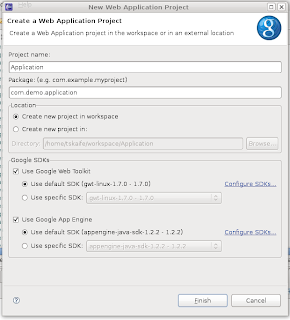
Create a pom for your project:
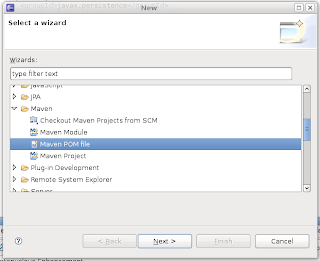

Edit the pom to look like this (profiles and resource filtering are definitely not needed and can be removed) and add any other jars you may need for your project:

<project xmlns="http://maven.apache.org/POM/4.0.0" xmlns:xsi="http://www.w3.org/2001/XMLSchema-instance"
xsi:schemaLocation="http://maven.apache.org/POM/4.0.0 http://maven.apache.org/maven-v4_0_0.xsd">
<modelVersion>4.0.0</modelVersion>
<groupId>com.demo.application</groupId>
<artifactId>Application</artifactId>
<version>0.0.1-SNAPSHOT</version>
<build>
<sourceDirectory>src</sourceDirectory>
<outputDirectory>war/WEB-INF/classes</outputDirectory>
<testSourceDirectory>test</testSourceDirectory>
<testOutputDirectory>target/test-classes</testOutputDirectory>
<resources>
<resource>
<filtering>true</filtering>
<directory>src</directory>
<includes>
<!--
This will include all files in the root source like
log4j.properties or applicationContext.xml
-->
<include>*.*</include>
<!--
This will include all files in client: 1. so this project can be
inherited by another project (needs java files) 2. will include
image files for image bundles
-->
<include>**/client/**</include>
<!-- This will include any css and image files in the public folder -->
<include>**/public/**</include>
<include>**/*.gwt.xml</include>
</includes>
</resource>
</resources>
<filters>
<!--
This tells which file to use for filtering, ${target} gets replaced
by the target property specified in your profile
-->
<filter>src/${target}.properties</filter>
</filters>
<plugins>
<plugin>
<artifactId>maven-compiler-plugin</artifactId>
<configuration>
<source>1.5</source>
<target>1.5</target>
<encoding>UTF-8</encoding>
</configuration>
</plugin>
<plugin>
<!--
This plugin will copy dependencies into the right outputDirectory
-->
<groupId>org.apache.maven.plugins</groupId>
<artifactId>maven-dependency-plugin</artifactId>
<configuration>
<outputDirectory>war/WEB-INF/lib</outputDirectory>
<overWriteReleases>true</overWriteReleases>
<overWriteSnapshots>true</overWriteSnapshots>
<overWriteIfNewer>true</overWriteIfNewer>
</configuration>
<executions>
<execution>
<id>copy-dependencies</id>
<phase>package</phase>
<goals>
<goal>copy-dependencies</goal>
</goals>
</execution>
</executions>
</plugin>
<plugin>
<groupId>org.apache.maven.plugins</groupId>
<artifactId>maven-resources-plugin</artifactId>
<version>2.3</version>
<configuration>
<encoding>UTF-8</encoding>
</configuration>
</plugin>
</plugins>
</build>
<repositories>
<repository>
<id>google-maven-repository</id>
<name>Google Maven Repository</name>
<url>http://google-maven-repository.googlecode.com/svn/repository/</url>
</repository>
</repositories>
<dependencies>
<dependency>
<groupId>com.google.appengine</groupId>
<artifactId>appengine-api-1.0-sdk</artifactId>
<version>1.2.1</version>
</dependency>
<dependency>
<groupId>com.google.appengine.orm</groupId>
<artifactId>datanucleus-appengine</artifactId>
<version>1.0.2.final</version>
</dependency>
<dependency>
<groupId>org.datanucleus</groupId>
<artifactId>datanucleus-core</artifactId>
<version>1.1.0</version>
<exclusions>
<exclusion>
<groupId>javax.transaction</groupId>
<artifactId>transaction-api</artifactId>
</exclusion>
</exclusions>
</dependency>
<dependency>
<groupId>org.datanucleus</groupId>
<artifactId>datanucleus-jpa</artifactId>
<version>1.1.0</version>
</dependency>
<dependency>
<groupId>org.apache.geronimo.specs</groupId>
<artifactId>geronimo-jta_1.1_spec</artifactId>
<version>1.1.1</version>
</dependency>
<dependency>
<groupId>org.apache.geronimo.specs</groupId>
<artifactId>geronimo-jpa_3.0_spec</artifactId>
<version>1.1.1</version>
</dependency>
<dependency>
<groupId>com.google.gwt</groupId>
<artifactId>gwt-servlet</artifactId>
<version>1.7.0</version>
</dependency>
<dependency>
<groupId>com.google.gwt</groupId>
<artifactId>gwt-user</artifactId>
<version>1.7.0</version>
</dependency>
<dependency>
<groupId>javax.jdo</groupId>
<artifactId>jdo2-api</artifactId>
<version>2.3-ea</version>
<exclusions>
<exclusion>
<groupId>javax.transaction</groupId>
<artifactId>transaction-api</artifactId>
</exclusion>
</exclusions>
</dependency>
<dependency>
<groupId>javax.transaction</groupId>
<artifactId>jta</artifactId>
<version>1.1</version>
</dependency>
</dependencies>
<profiles>
<profile>
<id>local</id>
<properties>
<target>local</target>
</properties>
</profile>
<profile>
<id>prod</id>
<properties>
<target>prod</target>
</properties>
</profile>
</profiles>
</project>


You'll have to install some of the jars into maven manually, they aren't really keeping up to date with these things. For the datanucleus-appengine-1.0.2.final.jar you have to use the one that was placed in the lib folder and run this command

mvn install:install-file -DgroupId=com.google.appengine.orm -DartifactId=datanucleus-appengine -Dversion=1.0.2.final -Dpackaging=jar -Dfile=/path/to/file

At this time I would enable maven (I got some error message but just hit ok):

If you are using profiles (you probably have an error in your project at this point) tell maven which active profile to use:

You'll get a message if you want maven to update your project, hit ok.
You're done, just ignore the warning about the missing gwt-servlet.jar, it will be there, just named differently.

now we just need to make an ant build.xml to make compiling, and deploying easy.

<project name="Application" default="java_compile" basedir=".">

<property file="./src/local.properties" />

<target name="java_compile" description="Java compile, filter resources, copy jars">
<echo>Make sure you have set up Maven Executable in ./src/local.properties</echo>
<echo>Your mvn exe is set to ${MAVEN_EXEC}</echo>
<!-- process-resources filters the files in the resources directory and copies them to target/classes -->
<!-- dependency:copy-dependencies copies the dependencies to the target/dependency folder -->
<delete dir="war/WEB-INF/lib" />
<exec taskname="compile project" dir="${basedir}" executable="${MAVEN_EXEC}">
<arg line="clean process-resources compile dependency:copy-dependencies -P local" />
</exec>
</target>

<path id="project.class.path">
<pathelement location="war/WEB-INF/classes" />
<pathelement location="${gwt.sdk}/gwt-user.jar" />
<fileset dir="${gwt.sdk}" includes="gwt-dev*.jar" />
<!-- Add any additional non-server libs (such as JUnit) -->
<fileset dir="war/WEB-INF/lib" includes="**/*.jar" />
</path>

<target name="gwt_compile" description="GWT compile to JavaScript" depends="java_compile">
<java failonerror="true" fork="true" classname="com.google.gwt.dev.Compiler">
<classpath>
<pathelement location="src" />
<path refid="project.class.path" />
</classpath>
<!-- add jvmarg -Xss16M or similar if you see a StackOverflowError -->
<jvmarg line="-Xmx512M" />
<!-- Additional arguments like -style PRETTY or -logLevel DEBUG -->
<arg value="com.demo.application.Application" />
</java>
</target>

<target name="create_war" depends="gwt_compile">
<echo>Creating the war file in target/Application.war</echo>
<zip destfile="target/Application.war" basedir="war" encoding="UTF8"/>
</target>
</project>


then our local.properties file needs to look something like this

gwt.sdk=/path/to/gwt-os-1.7.0
MAVEN_EXEC=/path/to/mvn.exe


Once that is done you need to run "ant java_compile" to copy the jars into the war/WEB-INF/lib folder. And every time you change the dependencies you'd want to run "ant java_compile"

Now if you ever want to simply create a war file without using eclipse you can just run "ant create_war"


As an Amazon Associate I earn from qualifying purchases.

Maven, GWT, and Eclipse round 2

So I've definitely made some progress in the Maven, GWT, and Eclipse integration. Below would be a working sample starting from a GWT project started using the google eclipse plugin.

Prerequisites:
Eclipse 3.4
Google Eclipse Plugin
m2eclipse plugin

Create your gwt project:

Create a pom for your project:
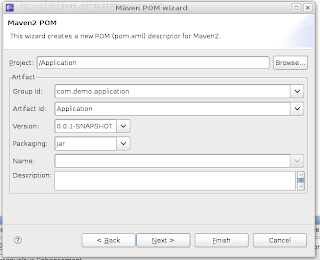

Edit the pom to look like this (profiles and resource filtering are definitely not needed and can be removed) and add any other jars you may need for your project:

<project xmlns="http://maven.apache.org/POM/4.0.0" xmlns:xsi="http://www.w3.org/2001/XMLSchema-instance"
xsi:schemaLocation="http://maven.apache.org/POM/4.0.0 http://maven.apache.org/maven-v4_0_0.xsd">
<modelVersion>4.0.0</modelVersion>
<groupId>com.demo.application</groupId>
<artifactId>Application</artifactId>
<version>0.0.1-SNAPSHOT</version>
<build>
<sourceDirectory>src</sourceDirectory>
<outputDirectory>war/WEB-INF/classes</outputDirectory>
<testSourceDirectory>test</testSourceDirectory>
<testOutputDirectory>target/test-classes</testOutputDirectory>
<resources>
<resource>
<filtering>true</filtering>
<directory>src</directory>
<includes>
<!--
This will include all files in the root source like
log4j.properties or applicationContext.xml
-->
<include>*.*</include>
<!--
This will include all files in client: 1. so this project can be
inherited by another project (needs java files) 2. will include
image files for image bundles
-->
<include>**/client/**</include>
<!-- This will include any css and image files in the public folder -->
<include>**/public/**</include>
<include>**/*.gwt.xml</include>
</includes>
</resource>
</resources>
<filters>
<!--
This tells which file to use for filtering, ${target} gets replaced
by the target property specified in your profile
-->
<filter>src/${target}.properties</filter>
</filters>
<plugins>
<plugin>
<artifactId>maven-compiler-plugin</artifactId>
<configuration>
<source>1.5</source>
<target>1.5</target>
<encoding>UTF-8</encoding>
</configuration>
</plugin>
<plugin>
<!--
This plugin will copy dependencies into the right outputDirectory
-->
<groupId>org.apache.maven.plugins</groupId>
<artifactId>maven-dependency-plugin</artifactId>
<configuration>
<outputDirectory>war/WEB-INF/lib</outputDirectory>
<overWriteReleases>true</overWriteReleases>
<overWriteSnapshots>true</overWriteSnapshots>
<overWriteIfNewer>true</overWriteIfNewer>
</configuration>
<executions>
<execution>
<id>copy-dependencies</id>
<phase>package</phase>
<goals>
<goal>copy-dependencies</goal>
</goals>
</execution>
</executions>
</plugin>
<plugin>
<groupId>org.apache.maven.plugins</groupId>
<artifactId>maven-resources-plugin</artifactId>
<version>2.3</version>
<configuration>
<encoding>UTF-8</encoding>
</configuration>
</plugin>
</plugins>
</build>
<repositories>
<repository>
<id>google-maven-repository</id>
<name>Google Maven Repository</name>
<url>http://google-maven-repository.googlecode.com/svn/repository/</url>
</repository>
</repositories>
<dependencies>
<dependency>
<groupId>com.google.appengine</groupId>
<artifactId>appengine-api-1.0-sdk</artifactId>
<version>1.2.1</version>
</dependency>
<dependency>
<groupId>com.google.appengine.orm</groupId>
<artifactId>datanucleus-appengine</artifactId>
<version>1.0.2.final</version>
</dependency>
<dependency>
<groupId>org.datanucleus</groupId>
<artifactId>datanucleus-core</artifactId>
<version>1.1.0</version>
<exclusions>
<exclusion>
<groupId>javax.transaction</groupId>
<artifactId>transaction-api</artifactId>
</exclusion>
</exclusions>
</dependency>
<dependency>
<groupId>org.datanucleus</groupId>
<artifactId>datanucleus-jpa</artifactId>
<version>1.1.0</version>
</dependency>
<dependency>
<groupId>org.apache.geronimo.specs</groupId>
<artifactId>geronimo-jta_1.1_spec</artifactId>
<version>1.1.1</version>
</dependency>
<dependency>
<groupId>org.apache.geronimo.specs</groupId>
<artifactId>geronimo-jpa_3.0_spec</artifactId>
<version>1.1.1</version>
</dependency>
<dependency>
<groupId>com.google.gwt</groupId>
<artifactId>gwt-servlet</artifactId>
<version>1.7.0</version>
</dependency>
<dependency>
<groupId>com.google.gwt</groupId>
<artifactId>gwt-user</artifactId>
<version>1.7.0</version>
</dependency>
<dependency>
<groupId>javax.jdo</groupId>
<artifactId>jdo2-api</artifactId>
<version>2.3-ea</version>
<exclusions>
<exclusion>
<groupId>javax.transaction</groupId>
<artifactId>transaction-api</artifactId>
</exclusion>
</exclusions>
</dependency>
<dependency>
<groupId>javax.transaction</groupId>
<artifactId>jta</artifactId>
<version>1.1</version>
</dependency>
</dependencies>
<profiles>
<profile>
<id>local</id>
<properties>
<target>local</target>
</properties>
</profile>
<profile>
<id>prod</id>
<properties>
<target>prod</target>
</properties>
</profile>
</profiles>
</project>


You'll have to install some of the jars into maven manually, they aren't really keeping up to date with these things. For the datanucleus-appengine-1.0.2.final.jar you have to use the one that was placed in the lib folder and run this command

mvn install:install-file -DgroupId=com.google.appengine.orm -DartifactId=datanucleus-appengine -Dversion=1.0.2.final -Dpackaging=jar -Dfile=/path/to/file

At this time I would enable maven (I got some error message but just hit ok):
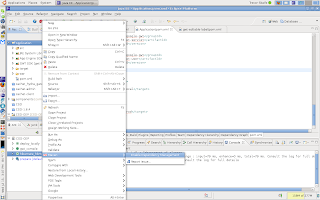
If you are using profiles (you probably have an error in your project at this point) tell maven which active profile to use:
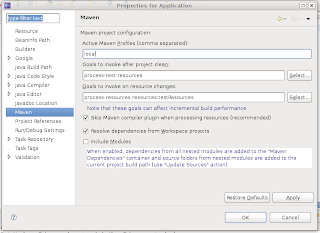
You'll get a message if you want maven to update your project, hit ok.
You're done, just ignore the warning about the missing gwt-servlet.jar, it will be there, just named differently.

now we just need to make an ant build.xml to make compiling, and deploying easy.

<project name="Application" default="java_compile" basedir=".">

<property file="./src/local.properties" />

<target name="java_compile" description="Java compile, filter resources, copy jars">
<echo>Make sure you have set up Maven Executable in ./src/local.properties</echo>
<echo>Your mvn exe is set to ${MAVEN_EXEC}</echo>
<!-- process-resources filters the files in the resources directory and copies them to target/classes -->
<!-- dependency:copy-dependencies copies the dependencies to the target/dependency folder -->
<delete dir="war/WEB-INF/lib" />
<exec taskname="compile project" dir="${basedir}" executable="${MAVEN_EXEC}">
<arg line="clean process-resources compile dependency:copy-dependencies -P local" />
</exec>
</target>

<path id="project.class.path">
<pathelement location="war/WEB-INF/classes" />
<pathelement location="${gwt.sdk}/gwt-user.jar" />
<fileset dir="${gwt.sdk}" includes="gwt-dev*.jar" />
<!-- Add any additional non-server libs (such as JUnit) -->
<fileset dir="war/WEB-INF/lib" includes="**/*.jar" />
</path>

<target name="gwt_compile" description="GWT compile to JavaScript" depends="java_compile">
<java failonerror="true" fork="true" classname="com.google.gwt.dev.Compiler">
<classpath>
<pathelement location="src" />
<path refid="project.class.path" />
</classpath>
<!-- add jvmarg -Xss16M or similar if you see a StackOverflowError -->
<jvmarg line="-Xmx512M" />
<!-- Additional arguments like -style PRETTY or -logLevel DEBUG -->
<arg value="com.demo.application.Application" />
</java>
</target>

<target name="create_war" depends="gwt_compile">
<echo>Creating the war file in target/Application.war</echo>
<zip destfile="target/Application.war" basedir="war" encoding="UTF8"/>
</target>
</project>


then our local.properties file needs to look something like this

gwt.sdk=/path/to/gwt-os-1.7.0
MAVEN_EXEC=/path/to/mvn.exe


Once that is done you need to run "ant java_compile" to copy the jars into the war/WEB-INF/lib folder. And every time you change the dependencies you'd want to run "ant java_compile"

Now if you ever want to simply create a war file without using eclipse you can just run "ant create_war"


As an Amazon Associate I earn from qualifying purchases.

GWT 1.6.3 - update procedures for Mac

1. Download the GWT folder:

2. Install GWT jars into the Maven2 Repository:

cd /opt/gwt/gwt-mac-1.6.3/

mvn install:install-file -DgroupId=com.google.gwt -DartifactId=gwt-user -Dversion=1.6.3 -Dpackaging=jar -Dfile=gwt-user.jar 


mvn install:install-file -DgroupId=com.google.gwt -DartifactId=gwt-servlet -Dversion=1.6.3 -Dpackaging=jar -Dfile=gwt-servlet.jar


mvn install:install-file -DgroupId=com.google.gwt -DartifactId=gwt-dev -Dversion=1.6.3 -Dpackaging=jar -Dfile=gwt-dev-mac.jar

3. Change your filter/properties files e.g. uki.properties:

GWT_DEV_JAR = /Users/uki/.m2/repository/com/google/gwt/gwt-dev/1.6.3/gwt-dev-1.6.3.jar

M2_REPO= /Users/uki/.m2/repository

4. Change your ANT build.xml (project specific):

< property name="GWT_SERVLET_PATH" value="${M2_REPO}\\com\\google\\gwt\\gwt-servlet\\1.6.3" / > 
< property name="GWT_USER_PATH" value="${M2_REPO}\\com\\google\\gwt\\gwt-user\\1.6.3" / >
< fileset dir="${GWT_SERVLET_PATH}"> < include name="*.jar" / > < /fileset >


As an Amazon Associate I earn from qualifying purchases.

GWT 1.6.3 - update procedures for Mac

1. Download the GWT folder:

2. Install GWT jars into the Maven2 Repository:

cd /opt/gwt/gwt-mac-1.6.3/

mvn install:install-file -DgroupId=com.google.gwt -DartifactId=gwt-user -Dversion=1.6.3 -Dpackaging=jar -Dfile=gwt-user.jar 


mvn install:install-file -DgroupId=com.google.gwt -DartifactId=gwt-servlet -Dversion=1.6.3 -Dpackaging=jar -Dfile=gwt-servlet.jar


mvn install:install-file -DgroupId=com.google.gwt -DartifactId=gwt-dev -Dversion=1.6.3 -Dpackaging=jar -Dfile=gwt-dev-mac.jar

3. Change your filter/properties files e.g. uki.properties:

GWT_DEV_JAR = /Users/uki/.m2/repository/com/google/gwt/gwt-dev/1.6.3/gwt-dev-1.6.3.jar

M2_REPO= /Users/uki/.m2/repository

4. Change your ANT build.xml (project specific):

< property name="GWT_SERVLET_PATH" value="${M2_REPO}\\com\\google\\gwt\\gwt-servlet\\1.6.3" / > 
< property name="GWT_USER_PATH" value="${M2_REPO}\\com\\google\\gwt\\gwt-user\\1.6.3" / >
< fileset dir="${GWT_SERVLET_PATH}"> < include name="*.jar" / > < /fileset >


As an Amazon Associate I earn from qualifying purchases.

Eclipse: running single test


To run a single test, or a group of tests use "*" for wild-cards and "," to separate the classes you want to run:

mvn -Dtest=*DaoTest, MyOtherTest test


As an Amazon Associate I earn from qualifying purchases.

Eclipse: running single test


To run a single test, or a group of tests use "*" for wild-cards and "," to separate the classes you want to run:

mvn -Dtest=*DaoTest, MyOtherTest test


As an Amazon Associate I earn from qualifying purchases.

Eclipse: using Maven dependencies in project

By using the Maven2 plugin for the Eclipse you can use your dependencies that are managed in pom.xml:


As an Amazon Associate I earn from qualifying purchases.

Eclipse: using Maven dependencies in project

By using the Maven2 plugin for the Eclipse you can use your dependencies that are managed in pom.xml:


As an Amazon Associate I earn from qualifying purchases.

apt quotation..