As an Amazon Associate I earn from qualifying purchases.

Updating Android JellyBean 4.2
Updating Android JellyBean 4.2 using ClockworkMod CWM & cyanogenmod for Android Developers.
If you are a Mac user you might be frustrated that there is no ODIN3 (Window software).
Actually, it is very easy with adb tool that every Android developer uses.
I am starting with stock Samsung Galaxy Tab 10.1 Android 3.0.1 (from Google I/O).

STEP 1)
Get cyanogenmod for your SPECIFIC device, get most stable version there is:
http://wiki.cyanogenmod.org/w/Devices#vendor=;

Galaxy Tab 10.1 Wi-Fi only model
http://wiki.cyanogenmod.org/w/P4wifi_Info
I got cm-10.1-20130522-NIGHTLY-p4wifi.zip
Samsung Galaxy Tab 7 T-Mobile:
http://get.cm/?device=p1
http://download.cyanogenmod.org/?type=stable&device=p1
Stable cm-9.1.0-p1.zip
Motorola Droid2
http://download.cyanogenmod.org/?type=stable&device=droid2
cm-7.2.0-droid2.zip
STEP 2)
Get Google Apps for your version of above
- cm-10 == Android 4.2.2
- cm-9 == ICS
- cm-7 == Gingerbread
you can easily find by searching "gapps-jb-2013"
http://rapidshare.com/files/3580601868/gapps-jb-20130301-signed.zip

STEP 3)
Get ClockworkMod CWM recovery.img
http://www.clockworkmod.com/rommanager

EXAMPLES:
Samsung Galaxy Tab (T-Mobile)
STEP 4) For Samsung: Inspect if there is no update in Kies (USB Debugging OFF), you can use thier for file transfer, too

STEP 5) Transfer there 2 ZIP files to /sdcard/ (USB Debugging ON)
- gApps
- cm-
Example:
uki:platform-tools uki$ adb push ~/Documents/Android/Samsung_Galaxy_Tab_7_TMobile/cm-9.1.0-p1.zip /sdcard/
3038 KB/s (144260310 bytes in 46.360s)
uki:platform-tools uki$ adb push ~/Documents/Android/Samsung_Galaxy_Tab_7_TMobile/gapps-ics-20120317-signed.zip /sdcard/
3263 KB/s (54485532 bytes in 16.304s)
uki:platform-tools uki$

I am showing 3 zip files because I tried older gApps previously.
STEP 6)
Turn OFF tablet by holding POWER button
STEP )
START device in fast boot mode (USB icon):
- hold VOLUME-DOWN (closer to power button) and press POWER button until device boots,
- select Fastboot, NOT download by pressing volume-down, make selection by pressing VOLUME-UP
STEP )
See if you can see your device
uki:platform-tools uki$ fastboot devices
288420043805517 fastboot
If you see similar (number) line as above, you are good to proceed.
STEP )
Install ClockworkMod CWM tool
Install ClockworkMod CWM tool
uki:platform-tools uki$ fastboot -u -S 0 flash recovery /Users/uki/Downloads/recovery-clockwork-6.0.3.1-p4wifi.img
sending 'recovery' (4844 KB)...
OKAY [ 0.341s]
writing 'recovery'...
OKAY [ 0.605s]
finished. total time: 0.946s
uki:platform-tools uki$
STEP )
uki:platform-tools uki$ fastboot reboot
rebooting...
finished. total time: 0.000s
The Tablet should start and be healthy.
STEP )
uki:platform-tools uki$ adb reboot recovery
uki:platform-tools uki$ adb reboot recovery
The Tablet should start with ClockworkMod Recovery menu. If is does not start it same as bafore (POWER + VOLUME DOWN) and select recovery (icon with box expanding)

STEP )
select - backup and restore (move with Volume UP, select with pressing Power button)
select - backup (will take a while, but it is VERY IMPORTANT)
...
Backup complete!
*** Go Back ***
STEP )select - backup and restore (move with Volume UP, select with pressing Power button)
select - backup (will take a while, but it is VERY IMPORTANT)
...
Backup complete!
*** Go Back ***
wipe data/factory reset
*** Yes...
STEP )
select advanced
select - wipe Dalvik cache
*** Yes
*** Go Back ***
STEP)
select install zip from sdcard
choose.. cm-10.1-2013......-p4wifi.zip from sdcard
*** Yes...
STEP )
install gapps-jb-2013.....zip from sdcard
STEP )
restart, press POWER button for 10 seconds
- unplug,
If it fails recover backup (should not happen)
STEP)
IMPORTANT!!! To enable "USB Debugging" and other {} Developer options:
Settings -> About tablet -> CLICK "Build number" line 6 times!!!!!!
I guess the last one is for the code gurus that spent 6 years in the high mountains writing this, one click per year. :)
STEP )
Update Android SKD Manager to versions 16 & 17

SUCCESS!

KNOWN BUG:
The keyboard closes after first character typed, which makes impossible to use the keyboard.
To fix it go to:
settings -> language & input -> click on settings icon next to "Android Keyboard (AOSP)" -> under TEXT CORRECTION
- set 'Auto-correction' to 'Off'
- set 'Show correction options' to 'Always hide'.
The SWYPE will still work, but it will not show auto-correction words on top, it is a minor setback. When I don't get a correct word in Swype mode, I have to type it character-by-character.
Updating Android JellyBean 4.2
Updating Android JellyBean 4.2 using ClockworkMod CWM & cyanogenmod for Android Developers.
If you are a Mac user you might be frustrated that there is no ODIN3 (Window software).
Actually, it is very easy with adb tool that every Android developer uses.
I am starting with stock Samsung Galaxy Tab 10.1 Android 3.0.1 (from Google I/O).
STEP 1)
Get cyanogenmod for your SPECIFIC device, get most stable version there is:
http://wiki.cyanogenmod.org/w/Devices#vendor=;
Galaxy Tab 10.1 Wi-Fi only model
http://wiki.cyanogenmod.org/w/P4wifi_Info
I got cm-10.1-20130522-NIGHTLY-p4wifi.zip
Samsung Galaxy Tab 7 T-Mobile:
http://get.cm/?device=p1
http://download.cyanogenmod.org/?type=stable&device=p1
Stable cm-9.1.0-p1.zip
Motorola Droid2
http://download.cyanogenmod.org/?type=stable&device=droid2
cm-7.2.0-droid2.zip
STEP 2)
Get Google Apps for your version of above
- cm-10 == Android 4.2.2
- cm-9 == ICS
- cm-7 == Gingerbread
you can easily find by searching "gapps-jb-2013"
http://rapidshare.com/files/3580601868/gapps-jb-20130301-signed.zip
STEP 3)
Get ClockworkMod CWM recovery.img
http://www.clockworkmod.com/rommanager
EXAMPLES:
Samsung Galaxy Tab (T-Mobile)
STEP 4) For Samsung: Inspect if there is no update in Kies (USB Debugging OFF), you can use thier for file transfer, too
STEP 5) Transfer there 2 ZIP files to /sdcard/ (USB Debugging ON)
- gApps
- cm-
Example:
uki:platform-tools uki$ adb push ~/Documents/Android/Samsung_Galaxy_Tab_7_TMobile/cm-9.1.0-p1.zip /sdcard/
3038 KB/s (144260310 bytes in 46.360s)
uki:platform-tools uki$ adb push ~/Documents/Android/Samsung_Galaxy_Tab_7_TMobile/gapps-ics-20120317-signed.zip /sdcard/
3263 KB/s (54485532 bytes in 16.304s)
uki:platform-tools uki$
I am showing 3 zip files because I tried older gApps previously.
STEP 6)
Turn OFF tablet by holding POWER button
STEP )
START device in fast boot mode (USB icon):
- hold VOLUME-DOWN (closer to power button) and press POWER button until device boots,
- select Fastboot, NOT download by pressing volume-down, make selection by pressing VOLUME-UP
STEP )
See if you can see your device
uki:platform-tools uki$ fastboot devices
288420043805517 fastboot
If you see similar (number) line as above, you are good to proceed.
STEP )
Install ClockworkMod CWM tool
Install ClockworkMod CWM tool
uki:platform-tools uki$ fastboot -u -S 0 flash recovery /Users/uki/Downloads/recovery-clockwork-6.0.3.1-p4wifi.img
sending 'recovery' (4844 KB)...
OKAY [ 0.341s]
writing 'recovery'...
OKAY [ 0.605s]
finished. total time: 0.946s
uki:platform-tools uki$
STEP )
uki:platform-tools uki$ fastboot reboot
rebooting...
finished. total time: 0.000s
The Tablet should start and be healthy.
STEP )
uki:platform-tools uki$ adb reboot recovery
uki:platform-tools uki$ adb reboot recovery
The Tablet should start with ClockworkMod Recovery menu. If is does not start it same as bafore (POWER + VOLUME DOWN) and select recovery (icon with box expanding)

STEP )
select - backup and restore (move with Volume UP, select with pressing Power button)
select - backup (will take a while, but it is VERY IMPORTANT)
...
Backup complete!
*** Go Back ***
STEP )select - backup and restore (move with Volume UP, select with pressing Power button)
select - backup (will take a while, but it is VERY IMPORTANT)
...
Backup complete!
*** Go Back ***
wipe data/factory reset
*** Yes...
STEP )
select advanced
select - wipe Dalvik cache
*** Yes
*** Go Back ***
STEP)
select install zip from sdcard
choose.. cm-10.1-2013......-p4wifi.zip from sdcard
*** Yes...
STEP )
install gapps-jb-2013.....zip from sdcard
STEP )
restart, press POWER button for 10 seconds
- unplug,
If it fails recover backup (should not happen)
STEP)
IMPORTANT!!! To enable "USB Debugging" and other {} Developer options:
Settings -> About tablet -> CLICK "Build number" line 6 times!!!!!!
I guess the last one is for the code gurus that spent 6 years in the high mountains writing this, one click per year. :)
STEP )
Update Android SKD Manager to versions 16 & 17
SUCCESS!
KNOWN BUG:
The keyboard closes after first character typed, which makes impossible to use the keyboard.
To fix it go to:
settings -> language & input -> click on settings icon next to "Android Keyboard (AOSP)" -> under TEXT CORRECTION
- set 'Auto-correction' to 'Off'
- set 'Show correction options' to 'Always hide'.
The SWYPE will still work, but it will not show auto-correction words on top, it is a minor setback. When I don't get a correct word in Swype mode, I have to type it character-by-character.
Default Google Account
I have a couple of Google accounts:
- my name @google.com
- my company email which is also done via Google
To change DEFAULT google account I had to sign OUT from all and sign in FIRST with the one I want as default.
For some Google entities I had to do it in reverse as my new email did not work with them.
- my name @google.com
- my company email which is also done via Google
To change DEFAULT google account I had to sign OUT from all and sign in FIRST with the one I want as default.
For some Google entities I had to do it in reverse as my new email did not work with them.
Default Google Account
I have a couple of Google accounts:
- my name @google.com
- my company email which is also done via Google
To change DEFAULT google account I had to sign OUT from all and sign in FIRST with the one I want as default.
For some Google entities I had to do it in reverse as my new email did not work with them.
- my name @google.com
- my company email which is also done via Google
To change DEFAULT google account I had to sign OUT from all and sign in FIRST with the one I want as default.
For some Google entities I had to do it in reverse as my new email did not work with them.
Children TV app for Mac OS
CyberWalkAbout.com is proud to announce a version of our popular "Children TV" app for Mac OS (desktop). ChildrenTV apps for iPhone and iPad that is now available on the App Store.
With a large selection of sorted age-appropriate videos, the fun-filled app is designed to reinforce foreign language skills and provide an entertaining cross-cultural experience for both kids and the entire family.
The app is available for download at: http://itunes.apple.com/us/app/childrentv/id491518606?mt=8

iPad page: http://cyberwalkabout.com/2011/08/children-tv-for-ipad.html
You tube Trailer: http://www.youtube.com/watch?v=TmrTPQsh7lg&feature=share Our Facebook Page: https://www.facebook.com/ChildrenTVapp
"App To Have for Mac" reports "Children TV" to be in the top 300 in the Entertainment category:

With a large selection of sorted age-appropriate videos, the fun-filled app is designed to reinforce foreign language skills and provide an entertaining cross-cultural experience for both kids and the entire family.
The app is available for download at: http://itunes.apple.com/us/app/childrentv/id491518606?mt=8

You tube Trailer: http://www.youtube.com/watch?v=TmrTPQsh7lg&feature=share Our Facebook Page: https://www.facebook.com/ChildrenTVapp
"App To Have for Mac" reports "Children TV" to be in the top 300 in the Entertainment category:

Beamboard app for iOS
CyberWalkAbout.com just released a new app for Beamboard.com!
Beamboard is a revolutionary mobile experience that might soon rival email and messaging.
It includes features such as:
- personal and organization messaging
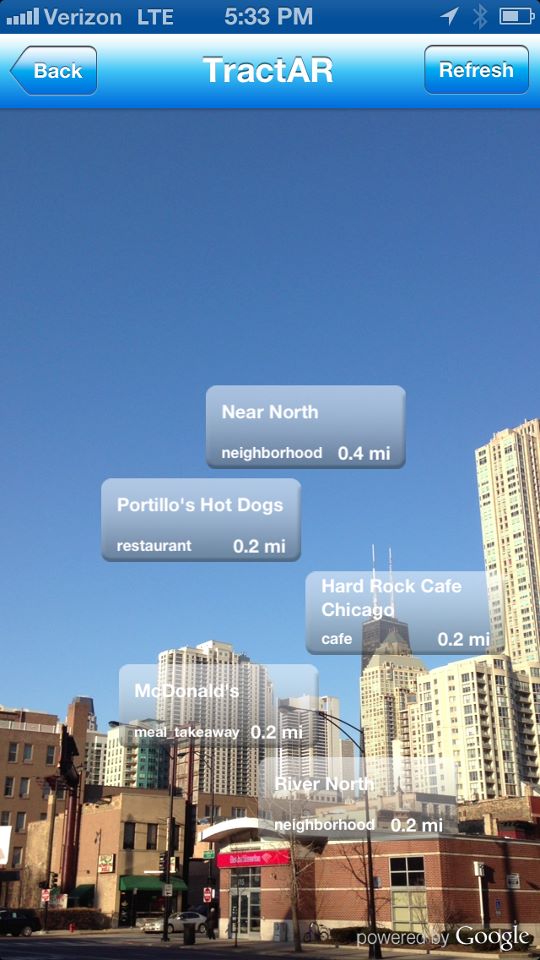
- map and camera augmented reality tracking
- categorized board of messages at glance
- ability to update and expire messages (unlike email)
- email processing
- advanced logo scanning and organization search
Visit our clients on Facebook
Clean navigation with "Octopad"

Categorized messages

Personal and Organizational messages (beams) in augmented reality:

Other (not beams) organizations shown in augmented reality

Animation of 3D mesh in Unity3D
- importing the mesh with animation from Maja to Unity3D
- setting the position of the mesh
- testing the animation and adjusting
Recommended videos:
Animation of 3D mesh in Unity3D
- importing the mesh with animation from Maja to Unity3D
- setting the position of the mesh
- testing the animation and adjusting
Recommended videos:
Subscribe to:
Comments (Atom)
Popular Recent Posts
-
 Keishin Kata (敬心形) of Shobudo (正武道) karate kei (敬) respect, reverence, or honor someone or something shin (心) heart or mind kata (形) fo...
 -
Before arriving in Okinawa, several experiences prepared me for what I would eventually learn there. Karate was the first. It introduced me ...
-
I came across Ruri Ohama mentioning a book by Takafumi Horie and Yoichi Ochiai titled: “Job Atlas for 10 Years From Now. How Will You Live i...
-
 Please look at the newer post: http://ukitech.blogspot.com/2009/09/eclipse-35-galileo-and-gwt-m2-svn.html 1) Upload a new version of Eclipse...
 -
 I have a habit of "stopping to smell the roses", or as in today's case, to take a photo of baby mushrooms on the forest floor....
 -
http://code.google.com/apis/socialgraph/
-
 Exception in thread "main" java.lang.OutOfMemoryError: Java heap space or Unable to execute dex: Java heap space Java h...
 -
 Step 1: Register you app with Facebook. Sign in to Facebook using your standard credentials. Navigate to http://www.facebook.com/developer...
 -
Many online videos warn about vegetables you should never eat, especially those rich in oxalates. The tone is dramatic. The reality is much ...

Most Popular Articles
-
Affordance as a Function of Intent and Action? As a person passionate about Behavioral Sciences, I found myself unable to shake the impre...
-
Step 1: Register you app with Facebook. Sign in to Facebook using your standard credentials. Navigate to http://www.facebook.com/developer...
-
Please look at the newer post: http://ukitech.blogspot.com/2009/09/eclipse-35-galileo-and-gwt-m2-svn.html 1) Upload a new version of Eclipse...
-
Creating Android ROS nodes to: - add control UI (HMI) - utilize existing phone sensors: -- gyroscope -- GPS -- compass -- camera - do...
-
 In this tutorial we will learn how to install the Intellij IDEA database plugin. Start with opening Settings > search for plugins ...
 -
Installing TuriCreate on Python 3.6 Anaconda Environment 1) Check what Python version Apple Turi Create supports https://github.com/ap...
-
 In this tutorial we will overview integration basics of Android Studio and Gradle build tools.
 -
This tutorial shows you how to change the code lower/upper case of code in Android Studio.
-
ImportError : No module named 'sklearn.model_selection' Before doing the embarrassing things I did below, read this: Setting Jupy...
-
This minimal PyTorch example implements a custom recurrent neural network (RNN) cell from first principles, showing how sequence memory eme...

